

A static ad is one image and a few words, with no sound, motion or creator to book. Plenty of brands on Meta run them right next to their video ads, and for some they're the main format.
This guide covers what a static ad is, how it compares to video, the eight formats that work, real examples from well-known brands, how to write the headline, how to test statics, and the sizes to use.
What is a static ad?
A static ad is a single still image used as an ad. It can be a product photo, a designed graphic, a screenshot, or a mix of all three, usually with a short headline on the image. On Meta it runs in Feed, Stories, Reels and the other placements, with your primary text above it and a headline and button below it.
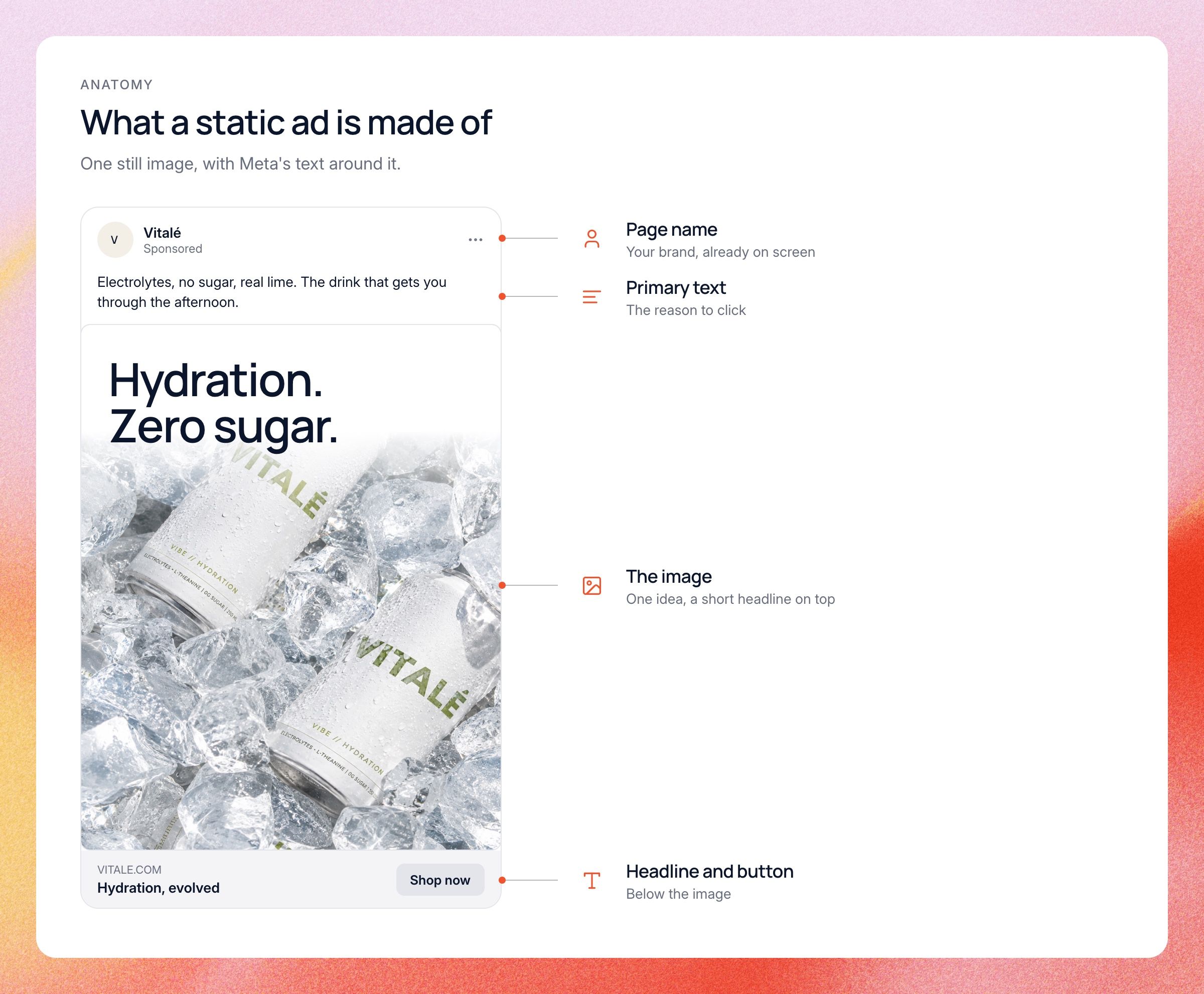
The word "static" sets it apart from video and motion. A carousel is a set of static images, but when marketers say static ad, they usually mean a single image. A GIF or a short animated graphic counts as motion.
Static ads are nothing new. Print ads, posters and billboards are all statics. What changed is how much they matter in paid social again.
Static vs video ads
Video and statics do different jobs, and most accounts need both. Video can show a product in use, tell a story and build trust with a face on camera. A static has to win in the second or so someone looks at it, so it lives or dies on one idea.
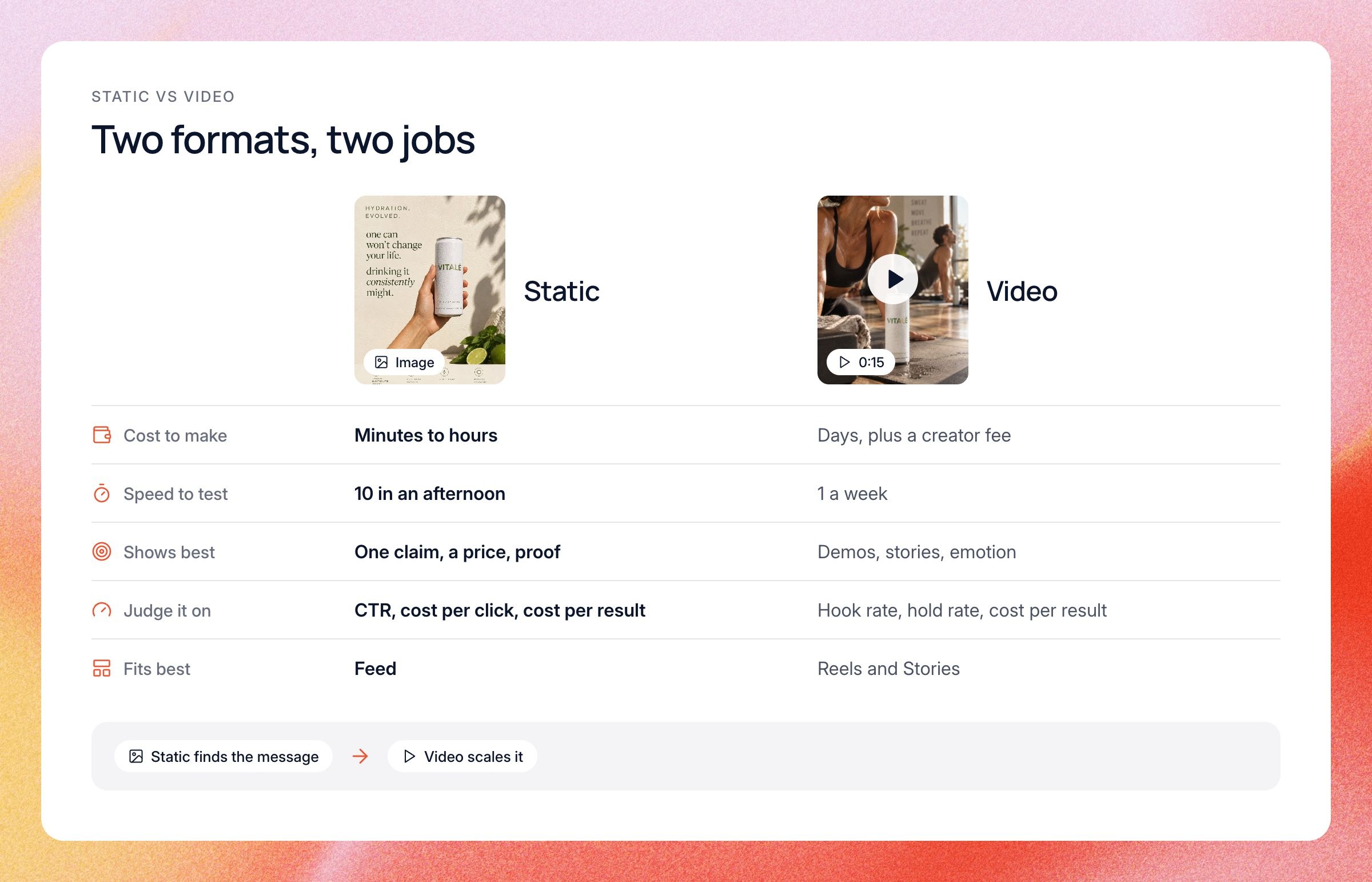
- Cost to make: a static takes minutes to a few hours. A video can take days, plus a creator fee.
- Speed to test: you can ship ten statics in the time one video gets edited.
- What it shows best: statics are great for one clear claim, a price, a comparison or proof. Video is better for demos, stories and emotion.
- How you judge it: video has hook rate and hold rate. A static has no watch time, so you judge it on click-through rate, cost per click and cost per result.
- Where it fits: statics shine in Feed. Reels and Stories lean toward video, but a well-made 9:16 static can still work there.
Use the two together. Test messages with statics, because they're fast and cheap. Then spend real production money on video for the ideas that already won as a static.
Why static ads are back on Meta
For a few years, the advice was simple: make more video, especially UGC. Lots of brands did exactly that, and their accounts filled up with ads that all looked alike. When every ad in the feed is a person talking to a phone, a bold image with one big line stands out.
Three things make statics worth your time right now:
- They're cheap to make. One designer, or one marketer with a good template, can turn out a week of ads in a day.
- They're fast to test. A static can be briefed, designed and live the same day. If it flops, you lost an afternoon, not a week and a creator budget.
- They let you try many concepts. Ten different statics cost less than one polished video.
That last point matters most. With broad targeting, Meta's delivery system decides who sees each ad, and it leans on the creative to make that call. A different idea can reach different people, so the number of different concepts you test counts for a lot. Statics are the cheapest way to get many concepts live.
A winning static is also a head start for video. Once a headline or angle has proven itself as an image, you know exactly what the video should say.
8 static ad formats that work
Most good statics fit one of a handful of formats. Each one carries a different kind of message, so mixing them gives Meta real variety to work with. Here are the eight we see work most often, and when to use each.
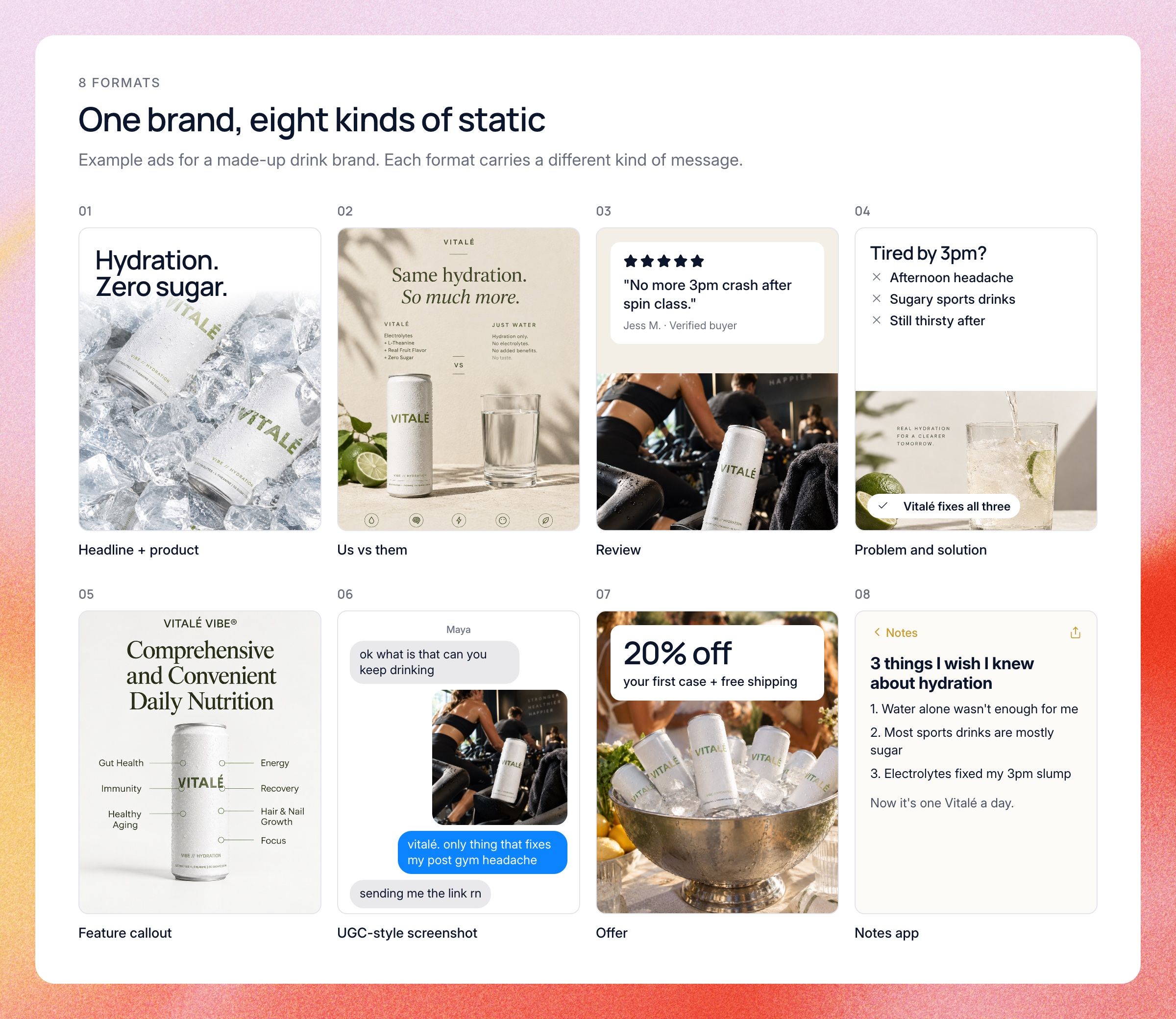
1. Headline + product
This is the simplest static: a clean product shot and one strong line. The line carries the benefit and the product shows it's real. It works best when your product is easy to understand at a glance, like a drink, a wallet or a face cream.
Keep the headline to a handful of words and make it big enough to read on a phone. If you need a second line to explain the first, the first line isn't working.
2. Us vs them comparison
Two columns: your product on one side, the usual option on the other. Checkmarks, crosses or plain numbers show why yours wins. It works because it does the comparing for the buyer, who was going to compare anyway.
The "them" doesn't need to be a named competitor. It can be "regular cereal", "your old wallet" or "doing it by hand in a spreadsheet". Keep it to three or four rows, and only use rows you can back up.
3. Testimonial or review screenshot
A real customer quote, a five-star review, or a screenshot of a review card. This is social proof in its most direct form. People trust other buyers more than they trust your brand.
Pick reviews that name a specific result or clear up a specific doubt. "Love it!" is weak. A review that says the product fixed a problem your reader has right now is strong. Always use real reviews, and ask permission when you need to.
4. Problem and solution
Show the problem first, then the fix. That can be a list of pains with the product at the bottom, a split image, or a before and after. The reader should see their own problem before they see your product.
Name the problem in the words your customers use. You can pull those words straight from reviews, support tickets and comments on your own ads.
5. Feature callout
A product image with lines or labels pointing at three or four key features. Think of it as a tiny product page in one picture. It works well for products with a few clear, physical selling points.
Stick to the features people actually buy for. Too many callouts turn the image into small text nobody can read on a phone.
6. UGC-style screenshot
An image that looks like it came straight from a phone: a text message, a social post, a comment thread or a DM. It feels native to the feed, so people read it before they notice it's an ad. It also sounds like a real person talking, which builds trust.
Keep it believable. A screenshot that looks staged hurts trust more than it helps. The same rules as UGC ads apply: real voices, real words.
7. Offer
Here the deal is the headline: a discount, free shipping, a bundle or a gift with purchase. Offer statics often do best with people who already know you and need a reason to buy now. They tend to do less for cold audiences who don't know the product yet.
Make the offer the biggest thing on the image and be clear about what people get. Don't crowd it with three other messages.
8. Notes app and native-looking ads
A plain screenshot of a phone notes app, a handwritten note, a sticky note or a simple text post. There's no design and no logo, only words. These look so unlike ads that people stop to read them.
They suit opinions, confessions, lists and founder-style messages. "3 things I wish I knew before buying a mattress" is a natural fit. The copy has to be good, because there's nothing else to look at.
Static ad examples from well-known brands
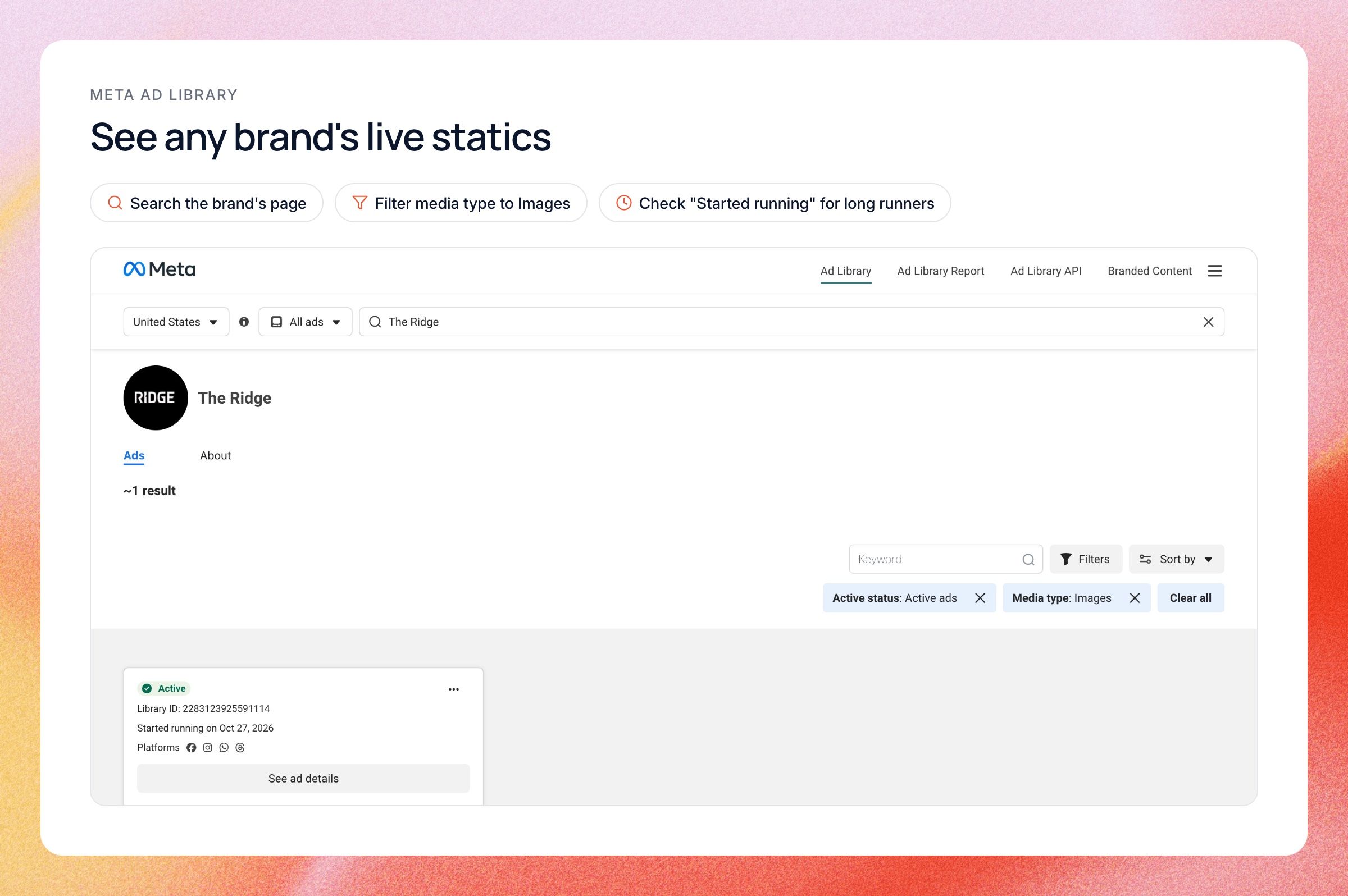
Looking at what strong brands do is the fastest way to learn these formats. Not all five examples below are Meta ads. Apple and Spotify ran theirs on billboards and in print, but the ideas carry over to a feed. To see what any brand runs on Meta right now, look it up in the Meta Ad Library.
Ridge: slim wallet vs bulky leather
Ridge, the metal wallet brand, builds much of its marketing around one comparison: its slim wallet against the overstuffed leather bifold. Its own site has a page called "5 Reasons to Ditch Your Leather Wallet". As a static, that's two wallets side by side, one stuffed and worn, the other slim.
The lesson is that a comparison doesn't need a table. Two objects side by side can say "this one is better" faster than any copy.
Magic Spoon: numbers that sell
Magic Spoon sells high-protein, zero-sugar cereal, and it sells it with the nutrition label. Its own product pages put grams of protein and sugar per serving next to classic sugary cereals like Froot Loops and Frosted Flakes. That chart is a ready-made comparison static.
Numbers are hard to argue with. If your product wins on something you can measure, put the number in the headline.
Liquid Death: the haters as the headline
Liquid Death sells canned water with heavy metal branding. Early on it started running ads built from real hate comments people left online, and the brand has said those were the highest-performing ads it had ever run. It later turned the same comments into songs on its Greatest Hates albums.
For statics, the lesson is that a screenshot of a real comment can be the entire ad. It feels native and honest, so people stop to read it. You need a strong brand voice to pull off the negative version, but the positive version, a glowing customer comment, works for anyone.
Apple: Shot on iPhone billboards
Apple started "Shot on iPhone" in 2015 with the iPhone 6. The first billboards and print ads were single photos taken by iPhone users, each with a small credit line naming the photographer. There was no feature list and no price, because the photo was the proof.
It's a reminder that the image can carry the whole claim. If your product makes something look better, show the result and say very little.
Spotify: listening data as the joke
At the end of 2016, Spotify ran a billboard campaign called "Thanks 2016, It's Been Weird", with lines built from real listening data. One asked the person who played "Sorry" 42 times on Valentine's Day what they did. Each one was big text on a bright color, and the data made the joke feel true.
It shows how far one sharp headline can go. There was no product shot and no feature list, only a line people wanted to share.
How to write a static ad headline
The headline is most of a static ad. People glance at the image, read the biggest words, and decide in about a second. Here is what makes a headline do its job:
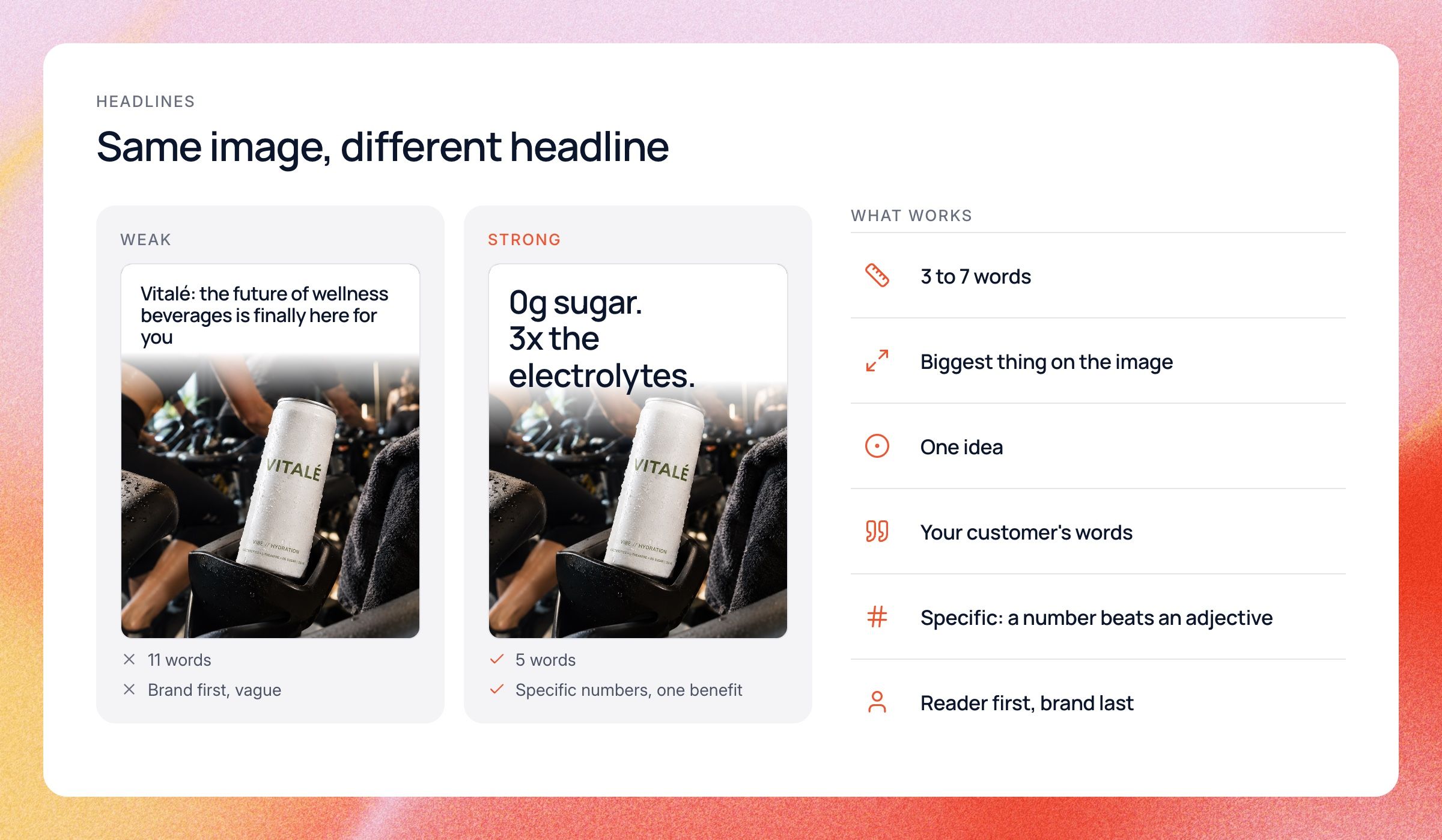
- Keep it short. About 3 to 7 words on the image.
- Make it big. It should be the first thing the eye lands on, even on a small phone screen.
- Say one thing. One benefit, one problem or one number.
- Use your customer's words. Lift phrases from reviews and comments instead of inventing slogans.
- Be specific. "Ready in 2 minutes" beats "fast and easy".
- Lead with the reader. Start with their problem or the result they want, not your brand name.
A good habit is to write ten headlines for every static you plan to make. Most will be bad, and that's fine. Pick the two or three clearest ones and test them on the same image, so you learn which words win.
Remember that the words on the image and the primary text above it do different jobs. The image headline stops the scroll, and the primary text gives the reason to click. Don't repeat the same line in both places.
Your page name and profile picture already sit right above the ad. A big logo on the image often wastes space you could use for the headline. Let the brand show up in the colors and the product instead.
How to test static ads
Statics are cheap, so you can test a lot of them. The trick is testing in a way that teaches you something. Here is the process we'd follow, and it fits inside any creative testing setup.
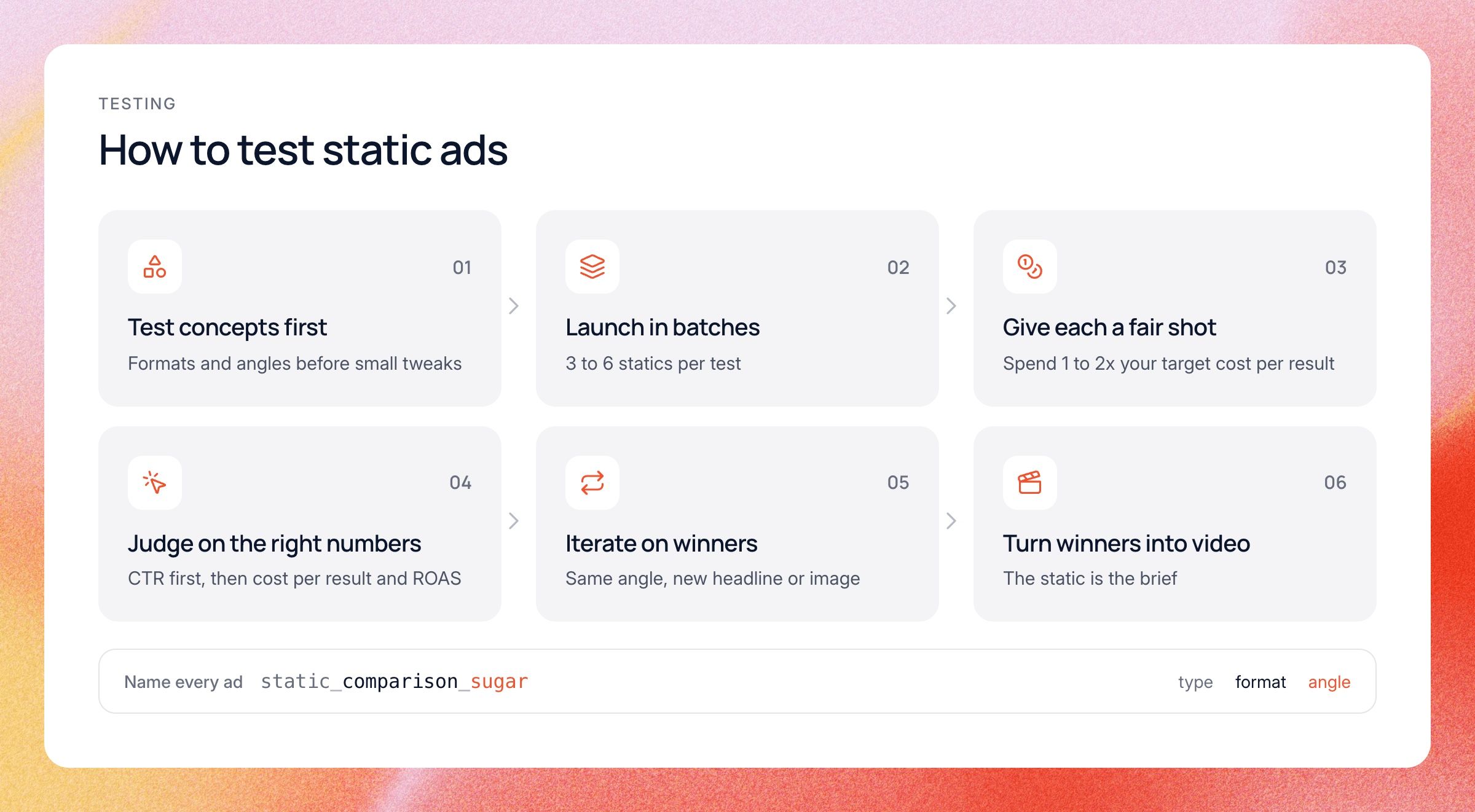
- Test concepts before tweaks. Start with different formats and angles. Changing a button color teaches you little until you know which idea works.
- Launch in batches. Put three to six statics in a test at once, so Meta can find the winners and you aren't relying on one ad.
- Give each ad a fair shot. A common starting point is to let an ad spend one to two times your target cost per result before you judge it.
- Judge on the right numbers. Look at click-through rate, cost per click, cost per result and ROAS. For statics, click-through rate is your early signal.
- Iterate on winners. Keep the angle, then try a new headline, a new image or a new color.
- Turn the best ideas into video. A static that keeps winning is your brief for the next video.
Name your ads so you can learn from them later. Put the format and the angle in every ad name, like "static_comparison_sugar" or "static_review_sleep". Then you can see which formats and angles win over months, not just which single ad won this week.
Keep an eye on fatigue too. A static has less to look at than a video, so it can wear out fast once the same people have seen it a few times. Watch ad frequency and click-through rate together, and read our guide to ad fatigue for how to spot it early.
Static ad sizes and specs
Getting the size right is the easiest win in this whole guide. A static in the wrong shape gets cropped or shows up small, and that alone can sink a good idea. Here are the sizes to use on Meta right now:
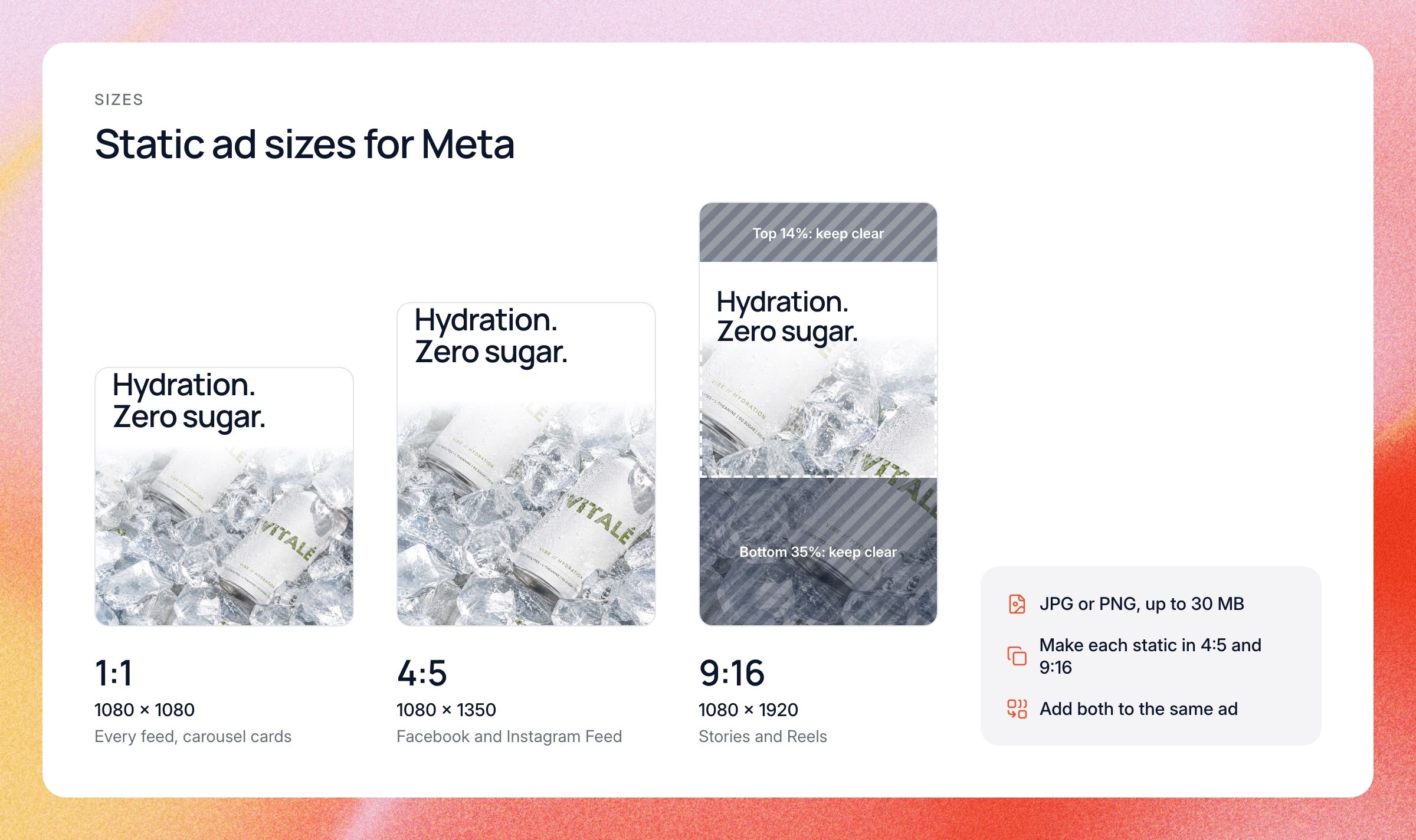
- 4:5 (1440 x 1800 pixels): Meta's recommended size for Facebook and Instagram Feed. It takes up more of the phone screen than a square. 1080 x 1350 is the same shape and works too.
- 1:1 (1080 x 1080 pixels): works in every feed and is the usual shape for carousel cards.
- 9:16 (1440 x 2560 pixels): for Stories and Reels. Meta says to keep text and logos out of the top 14% and bottom 35% of the image, where the profile name and buttons sit.
- File type and size: JPG or PNG, up to 30 MB.
The easy setup is to make every static in two versions, 4:5 and 9:16, and add both to the same ad. Meta then shows the right one in each placement.
Meta dropped its old 20% text rule in 2020, so there's no hard limit on text in the image anymore. An image with less text is still easier to read on a phone, so keep it short. Specs do change, so check Meta's Ads Guide before a big launch.
If you run statics on other platforms, the shapes shift a little. Pinterest favors tall 2:3 images (1000 x 1500 pixels). LinkedIn single image ads run as wide 1.91:1, square 1:1, or 4:5 vertical on mobile. The same headline rules apply everywhere.
Common static ad mistakes
Most weak statics fail for the same few reasons, and each one is easy to fix once you spot it. Here are the ones we see most:
- Too much text. If the image needs reading glasses, it won't get read.
- Too polished. An ad that looks like a brand poster is easy to scroll past. A little rough often works better.
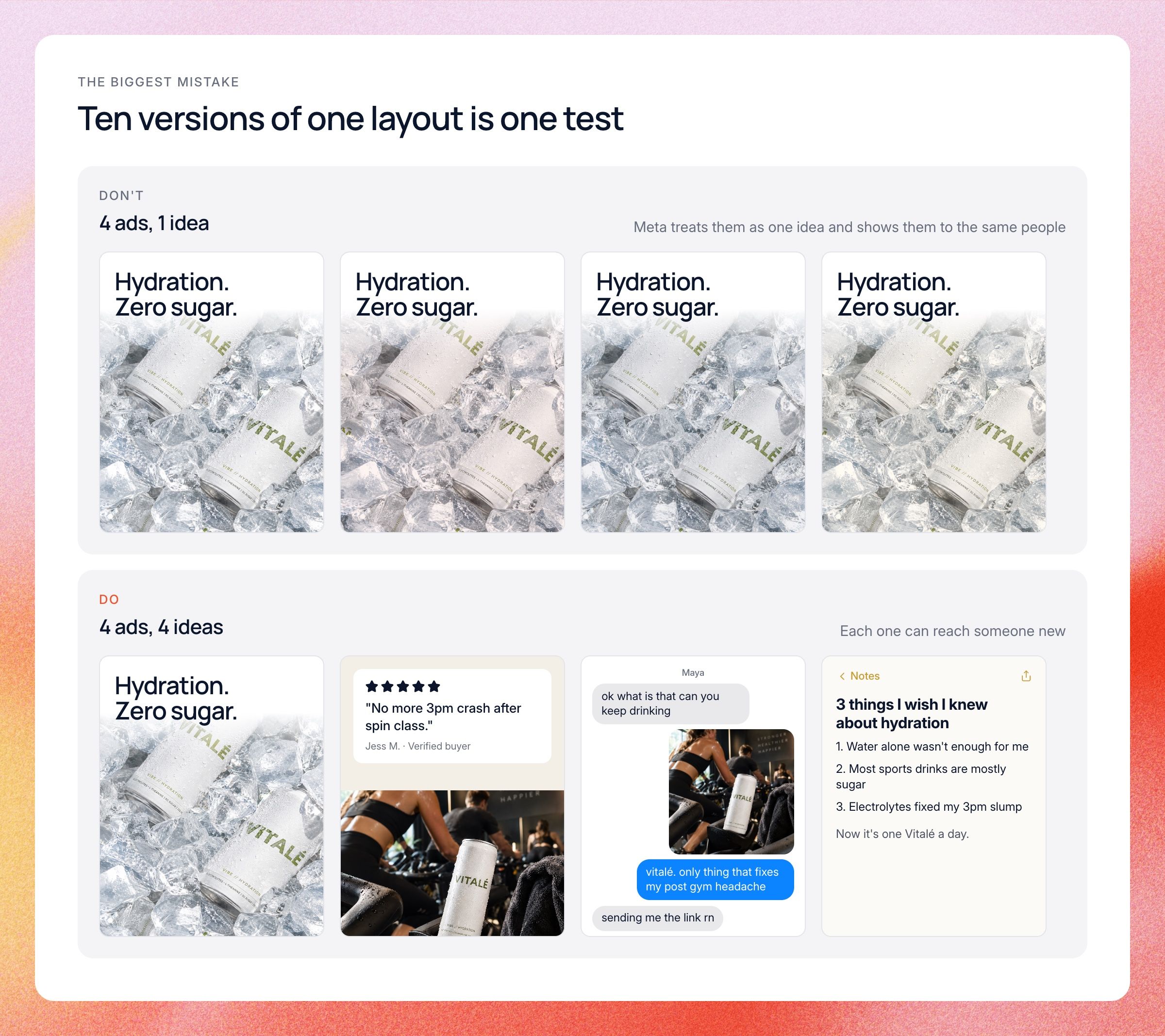
- Every ad looks the same. Ten versions of one layout only tests one idea.
- Calling it too early. One bad day doesn't tell you much. Give each ad a few days and enough spend first.
The biggest one is sameness. If every static in your account uses the same layout, colors and angle, Meta can end up treating them as one idea and showing them to the same people. Mix formats, angles and looks on purpose, so each ad has a chance to reach someone new.
Do this with AI
You can find your best static formats with ChatGPT or Claude and one export. In Ads Manager, export the last 30 days at the ad level with ad name, spend, impressions, click-through rate, cost per click, results, cost per result and frequency. It works best if your ad names already say whether the ad is a static or a video, plus the format and angle.
Paste the export into a chat with this prompt. It splits statics from videos, groups statics by format, and tells you what to make next.
You are a senior creative strategist. Below is a Meta Ads Manager export for the last 30 days: one row per ad, with ad name, spend, impressions, CTR, CPC, results, cost per result and frequency. Ad names include the type, format and angle, for example static_comparison_sugar or video_review_sleep. 1. Split ads into statics and videos using the ad name. Compare the two groups on total spend, CTR, CPC and cost per result. 2. Group the statics by format (headline + product, comparison, review, problem and solution, feature callout, UGC screenshot, offer, notes app) and by angle. Only include ads with at least [your minimum spend]. Show which formats and angles win. 3. Flag any static where frequency is rising and CTR is falling. 4. Suggest the next 5 statics to make: format, angle and one headline each, based on what already won. 5. Name the 2 winning static ideas most worth turning into a video. Return a table first, then a short summary I can send to my designer. Data: [paste your export here]
The downside is that you have to repeat this every week with a fresh export, and it only works if your ad names are clean.
How this works in Lemonado
Lemonado's Creatives workspace connects to your ad accounts across Meta, Google, TikTok, LinkedIn, Pinterest and Snapchat. Your statics and videos sit in one place, with performance trends and fatigue scores for each, plus hook and hold rates for video. Ask Lemonado to compare your ads by format or angle, and it tells you which ones win and why.
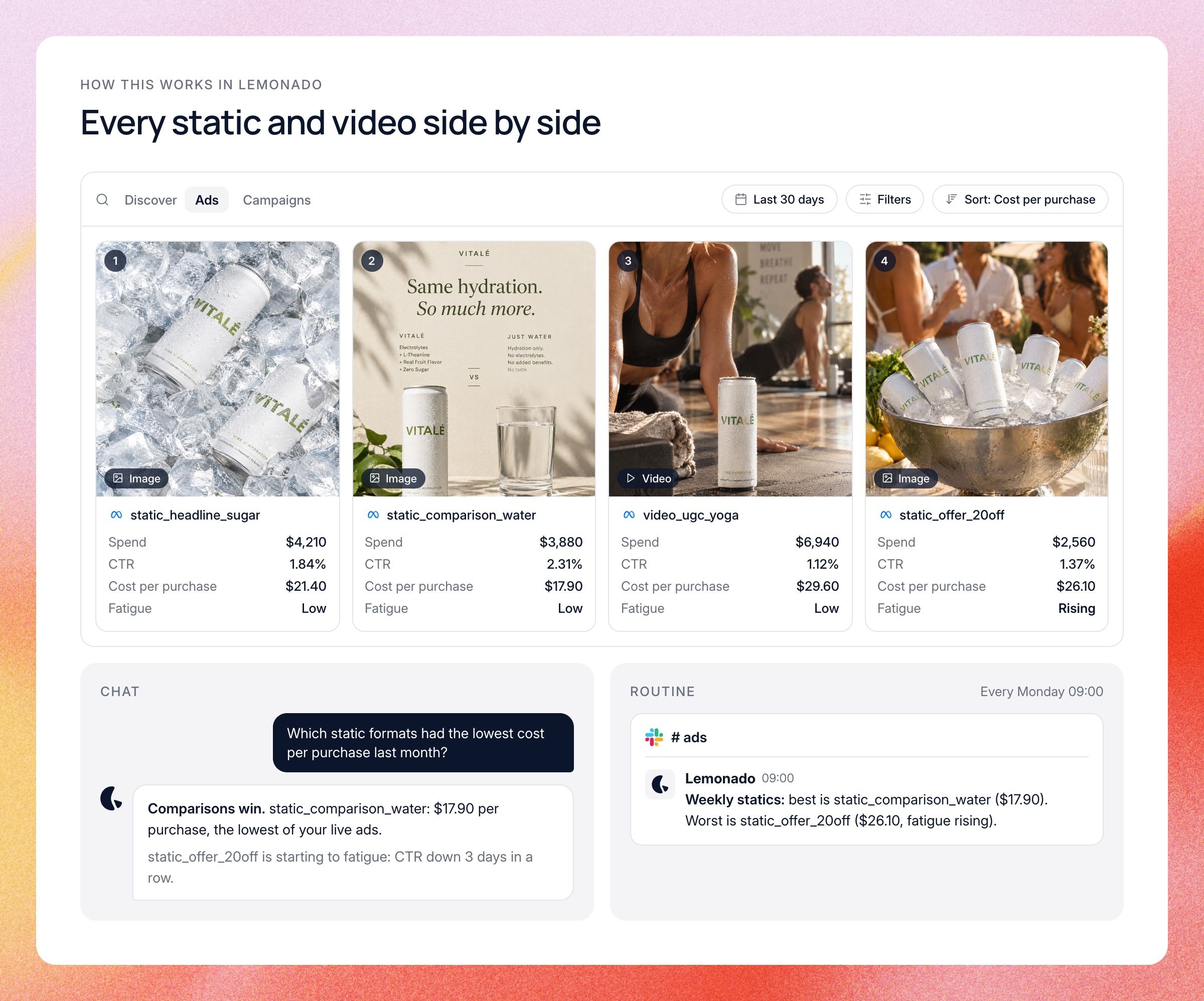
Discover, in Creatives, lets you browse competitors' ads too. Save the ones you like for your team and ask Lemonado why they work: which hooks, angles, offers and landing pages keep showing up. Discover works in the free trial, even before you connect any data. We wrote more about this in our guide to competitor ads.
You can also ask in plain words. In Chat, try "Which static formats had the lowest cost per purchase last month, and which are starting to fatigue?" Or set up a Routine that posts a weekly summary of your best and worst statics to Slack every Monday.
Your designer still makes the statics. Lemonado helps you pick which ones to make next, based on what's already working, so their time goes into ideas with proof behind them.
FAQs
Short answers to the questions we hear most about static ads. The sections above go deeper on each one.
What is a static ad?
A static ad is a single still image used as an ad, with no video or motion. It's usually a product photo, a graphic or a screenshot with a short headline on top. On Meta, it shows with primary text above it and a headline and button below.
What is an example of a static ad?
A classic example is a comparison ad, like a slim Ridge wallet next to a stuffed leather bifold. Another is Magic Spoon's chart setting its protein and sugar numbers against regular cereal. Review screenshots, offer banners and notes app screenshots are all static ads too.
What size should a static ad be?
For Meta, use 4:5 (Meta recommends 1440 x 1800 pixels) for Feed and 9:16 (1440 x 2560 pixels) for Stories and Reels. Square 1:1 works everywhere and is the usual shape for carousel cards. Make a 4:5 and a 9:16 version of each static and add both to the same ad.
Are static ads better than video ads?
Neither is better everywhere. Statics are cheaper and faster, so they're great for testing many ideas quickly. Video is better for demos and stories, and a good setup uses statics to find winning messages and video to scale them.
What makes a good static ad?
A good static has one clear idea, a big short headline, and an image that proves the claim. It's easy to read on a phone in about a second. It also looks different from the other ads in your account, so it has a chance to reach new people.
How many static ads should I test at once?
Three to six per test is a good range for most budgets. That gives Meta enough choice to find a winner without spreading spend too thin. Make sure they are different concepts, not small tweaks of one ad.
Find your next winning static
The best statics come from knowing which formats and angles already work, in your account and in your competitors'. Guessing can cost you weeks of spend, while comparing them side by side takes minutes.
Get $150 in credits, no card needed. Connect your ad accounts and see which of your statics are pulling their weight.