
Your best ad is dying right now, and most teams find out a week late, when the cost per result has already jumped. That is ad fatigue. It is real, it is expensive, and it is also one of the most misdiagnosed problems in paid social.
This guide explains what ad fatigue is, how to tell it apart from the things that look like it, and what to do when you catch it. It includes a real example from our own Meta account, and the Routine we now use to catch it automatically.
What ad fatigue is
Ad fatigue happens when the same people see the same ad too many times and stop responding to it. They scroll past faster, click less, and convert less. The platform notices the weaker response and charges you more to keep showing the ad.
You will also hear it called creative fatigue. Meta uses that name in Ads Manager, and most creative teams use it too. Ad fatigue sometimes means people are tired of your ads in general, while creative fatigue points at one specific ad, but in day-to-day work the two terms mean the same thing.
Fatigue has two sides. Creative fatigue is when the ad itself has worn out. Audience fatigue is when your audience is too small, so even fresh ads reach the same people over and over. The fix is different for each, which is why the diagnosis matters.
Why ad fatigue happens
Every ad has a shelf life. The first people to see it are the ones most likely to care, because the platform finds them first. As the ad keeps running, it reaches people who are less interested, and it reaches the interested ones again and again.
The speed depends on three things. The size of your audience, how much you spend against it, and how distinctive the ad is. A small audience with a big budget burns through an ad in days. A broad audience with a modest budget can keep one ad healthy for months.
In our own Meta account, the fatigue cycle has been short, roughly a week before a new ad starts losing steam. Short shelf lives are normal on Meta now. That makes spotting fatigue early matter more than ever.
Signs of ad fatigue
Fatigue rarely shows up in one number. It shows up as a pattern across several numbers moving together over a week or two. These are the signs to watch:
- Click-through rate drops compared to the ad's own first week, not the account average
- Frequency climbs as the ad reaches the same people more often
- CPM rises because the platform charges more for an ad people ignore
- Cost per result climbs while spend stays the same
- Hook rate falls on video ads, because people swipe away sooner
- Negative feedback grows, like hides and "stop seeing this ad"
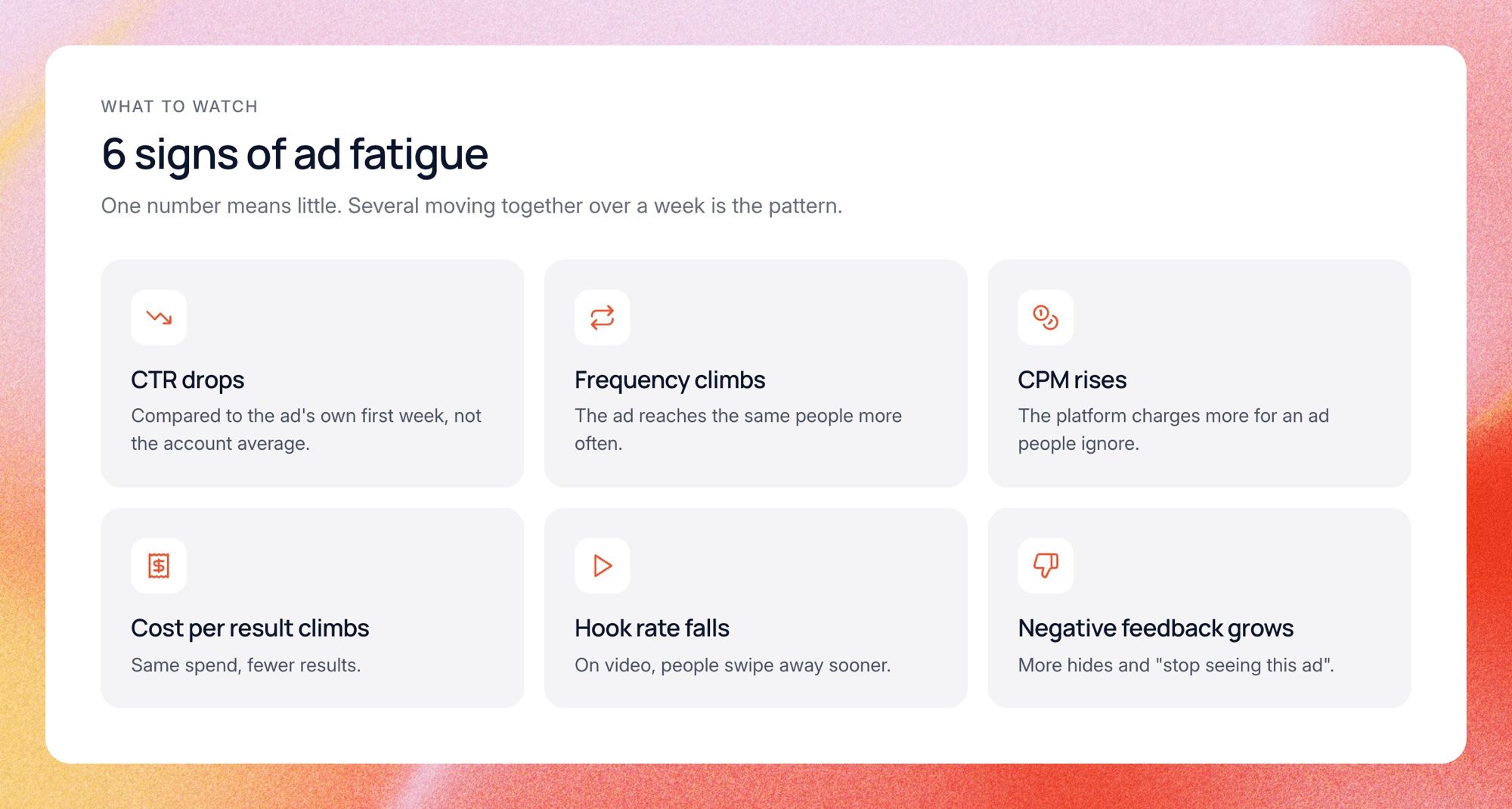
The first two together are the classic picture. If CTR falls by a fifth or more over seven days while frequency rises, take a closer look. One bad day means nothing, so always compare a full week to a full week.
Always compare the ad to its own past, not to your other ads. An ad with a 1% CTR may be perfectly healthy for its format and audience. An ad that drops from 3% to 2% is the one in trouble, even though 2% looks fine on paper.
What looks like ad fatigue but isn't
This is the part most guides skip. Plenty of things make an ad's numbers drop, and only some of them are fatigue. If you swap out a healthy ad because of a problem somewhere else, you lose a winner and the problem stays.
Things that often get mistaken for fatigue:
- Placement shifts, when the platform moves your ad to cheaper, weaker placements
- A broken pixel or tracking change, which makes results fall while clicks hold
- A landing page problem, where CTR is fine but conversions drop
- Seasonality or a competitor push, which lifts CPMs across every ad, not just one
- Learning phase resets after big budget or setting changes
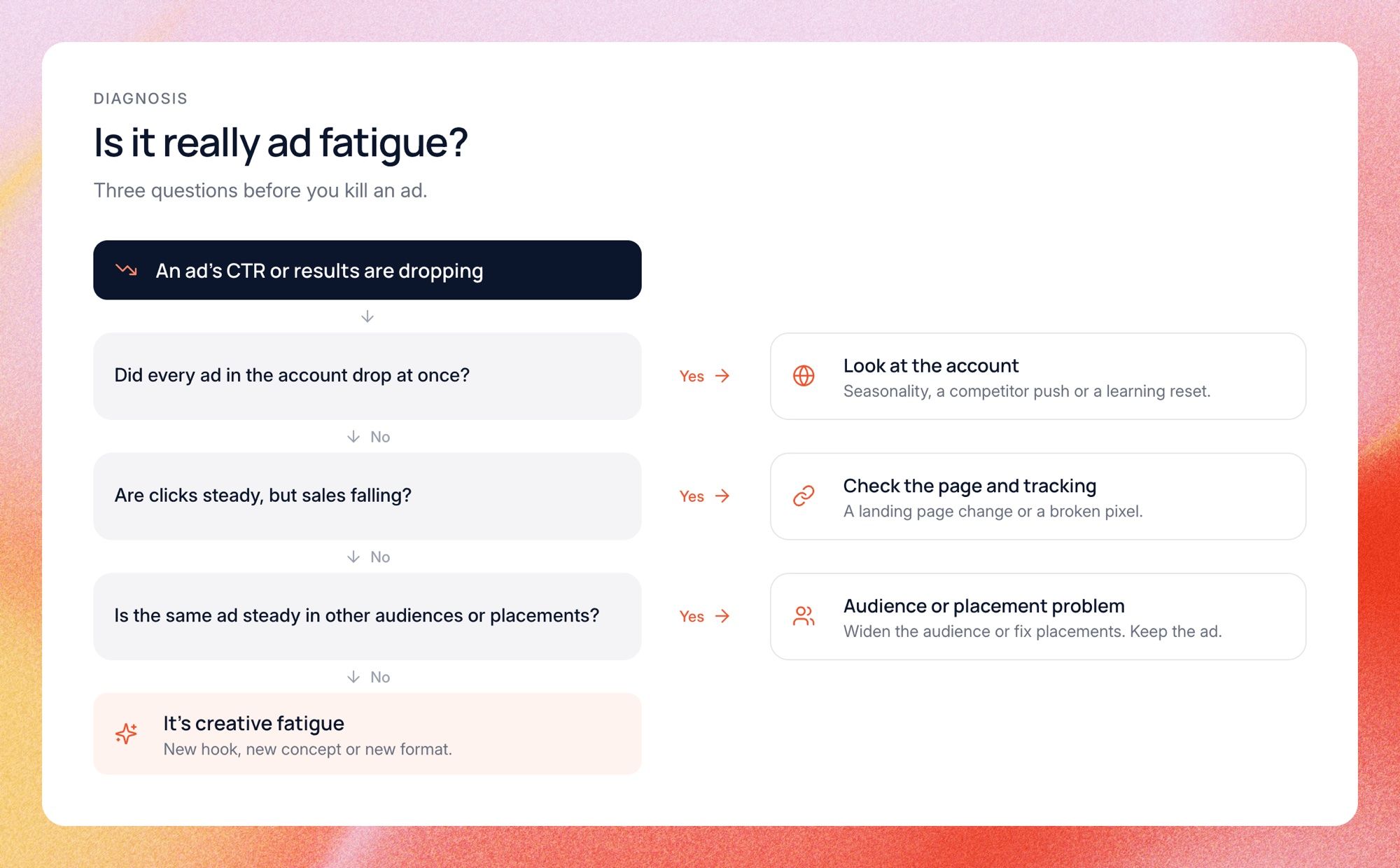
The test is simple. Real creative fatigue hits one ad harder than its neighbors, on the placements that matter. If every ad drops together, look at the account. If clicks hold and sales fall, look at the page and the tracking.
How to check for ad fatigue step by step
You can do this check in Ads Manager in about ten minutes per ad. It is worth doing before every "kill or keep" call on a big spender. Here is the order we use:
- Pick the comparison window. Compare the last 7 days to the ad's first full week at scale.
- Look at CTR and frequency together. Falling CTR plus rising frequency is the first flag.
- Break it down by placement. Check Facebook feed, Instagram feed, Reels and Stories separately.
- Compare against sibling ads. If the other ads in the ad set dropped too, the cause is likely the audience or the account.
- Check conversion numbers next. If clicks hold but conversions fall, look at the landing page and tracking before the creative.
- Read Meta's delivery column. Ads Manager may flag an ad as creative fatigue or creative limited, which is a useful second opinion.
Step three is the one most teams skip. Ads Manager shows blended numbers by default, so a shift between placements can look exactly like fatigue. Adding the placement breakdown takes two clicks.
If you run many accounts, this check gets slow fast. Doing it by hand for every big spender, every week, is exactly the kind of work worth handing off.
How we spot ad fatigue in our own account
Here is a real example from our own Meta ads, using Facebook and Instagram numbers only. We ran the same static ad in two places: its own campaign, and a mixed ad set aimed at a small audience. The two tell very different stories.
In the mixed ad set, the ad started strong with a 4.7% click-through rate in its first week. Then we nearly tripled its spend. The next week the CTR fell to 2.6%, and it kept sliding to 2.5%, 2.3% and 2.1% over the following weeks. Frequency on Facebook rose from 1.6 to 2.1 in the same week the drop started. That ad set only reached about 15,000 people, so more budget meant showing the same ad to the same people.
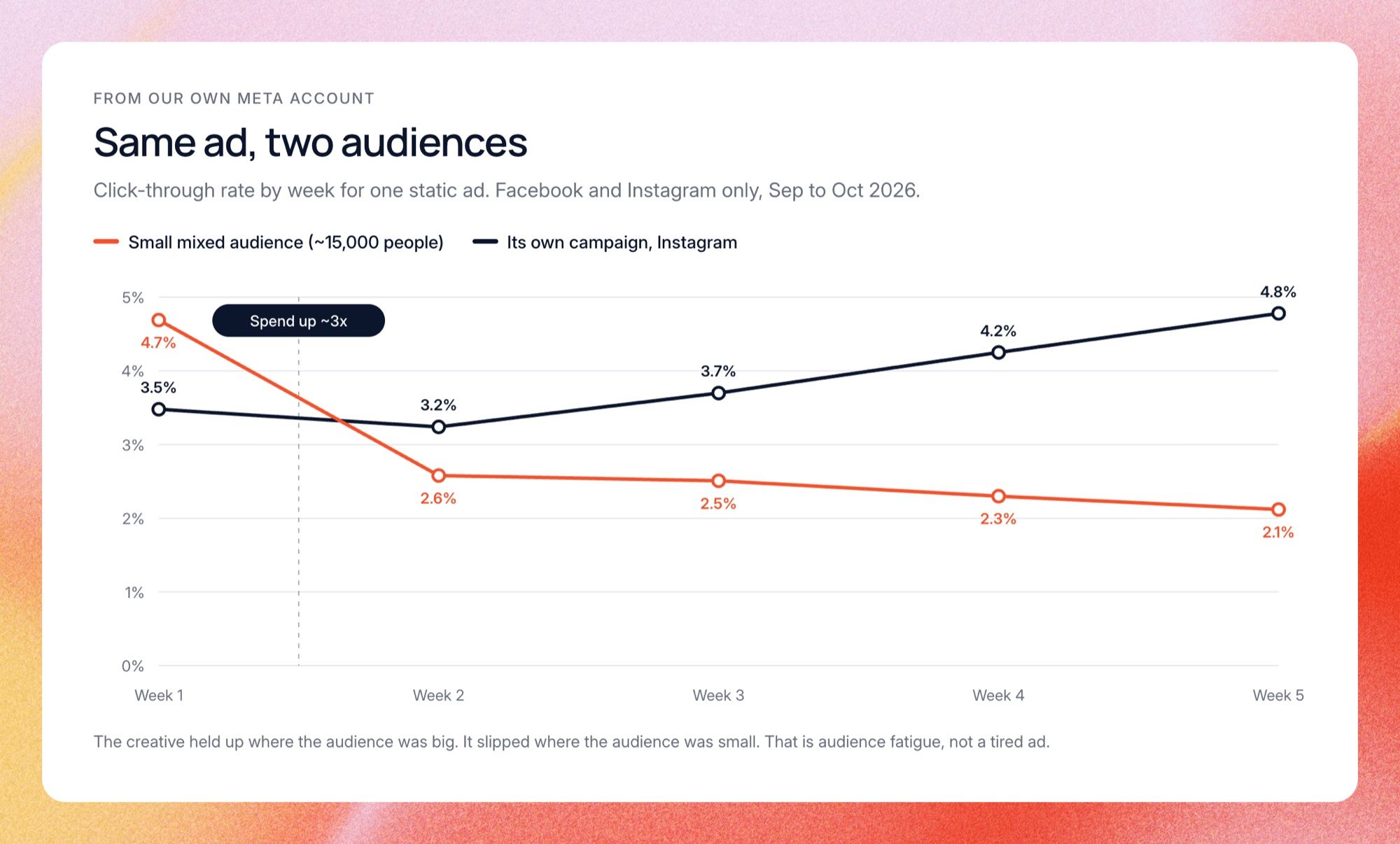
In its own campaign, the exact same image held up fine. On Instagram its CTR stayed between 3.2% and 4.8% for five weeks straight. So the creative was not worn out. The small audience was. That told us the fix was a broader audience, not a new ad.
This is why we never judge an ad on one blended number. We compare each ad to its own first week, split by placement, and check if the same creative is slipping everywhere or only in one audience. Doing that by hand every week was slow, so we set up a Lemonado Routine that does it for us. Now it tells us in Slack every time an ad starts to slip, along with which audience and placement it is slipping in.
How to fix ad fatigue
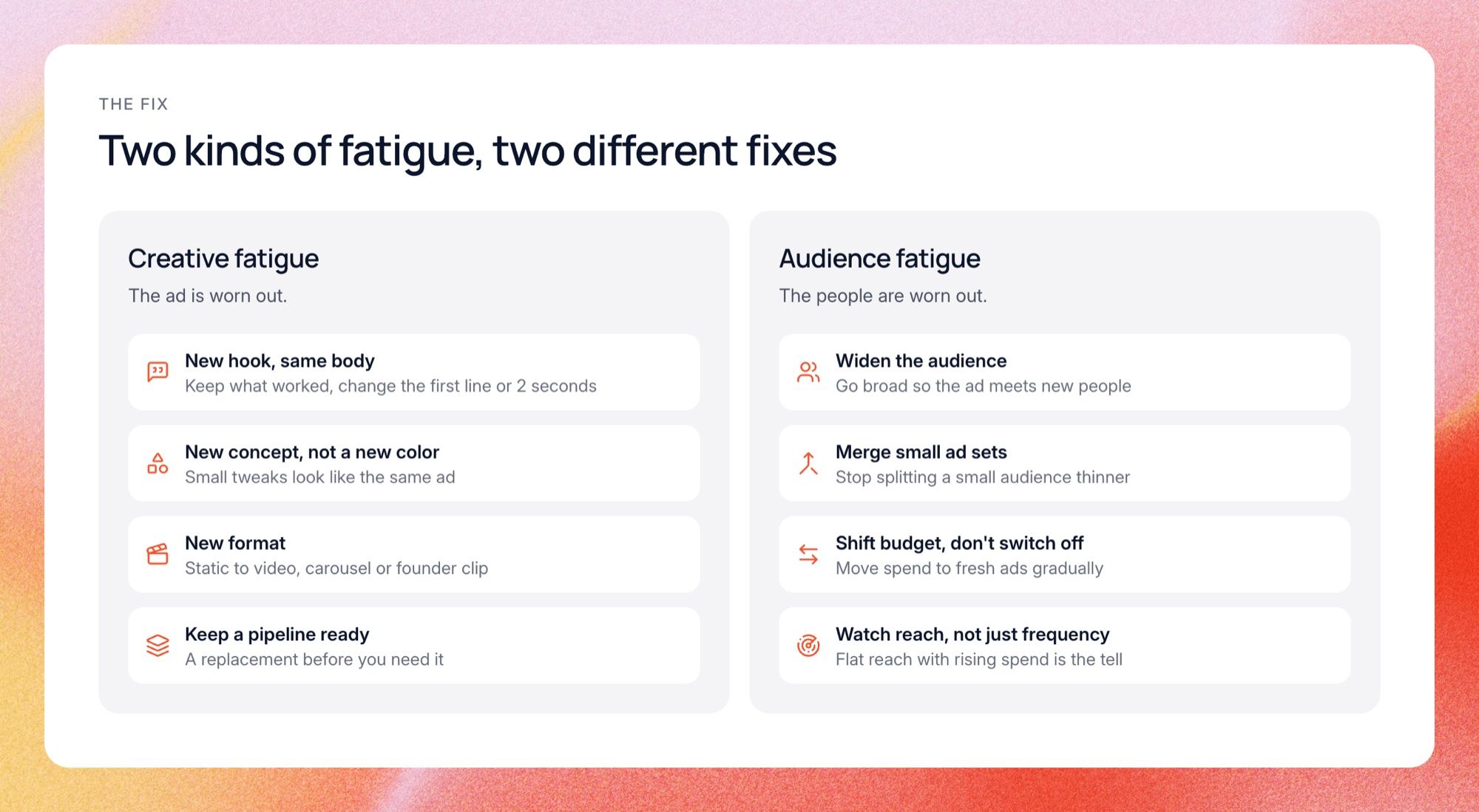
Once you are sure it is fatigue, the fix depends on which kind it is. Creative fatigue needs new creative. Audience fatigue needs more people. These are the moves that work:
- Write a new hook for the same ad. Keep the body and offer that worked, and change the first line or first two seconds.
- Make a new concept, not a new color. Small visual tweaks often get treated as the same ad by the platform and by people.
- Change the format. Turn a winning static into a video, a carousel or a founder clip.
- Widen the audience. Go broader, or merge small ad sets, so the ad reaches new people.
- Lower the budget on the tired ad and move the spend to fresh ones, instead of switching it off cold.
- Keep a steady pipeline of new ads, so a replacement is ready before you need it.
The first move is usually the best place to start. When an ad wears out, the message often still works and only the opening has gone stale. In our own account, three different videos shared the same opening line and all held about 10% of viewers to the quarter mark. The topics were different and the result was the same, which told us the hook was the weak spot, not the idea.
On audience fatigue, look at your reach. In the same small ad set from our example above, a video cost more than twice as much per thousand impressions as it did in its own campaign. A broader audience fixes that. More creative does not.
How to prevent ad fatigue
You cannot stop ads from wearing out, but you can stop being surprised by it. Prevention comes down to having fresh creative ready and seeing the drop before your budget does. Three habits help most.
First, launch new ads on a schedule, not in a panic. A few new concepts every week beats ten random videos on a Friday night when the numbers already look bad. A steady rhythm also gives you cleaner tests, because you know what changed.
Second, watch every live ad against its own baseline, every day. Fatigue is a slow slide, and slow slides are easy to miss when you check weekly. Third, keep a record of why past winners won, so each new ad starts from evidence instead of guesswork.
Do this with AI
You can run this check with ChatGPT or Claude today. Export a weekly report from Ads Manager with one row per ad, per week, per placement, and paste it into a chat with the prompt below. It compares each ad to its own first week and tells you which kind of fatigue you are looking at.
You are a senior performance marketer. Below is a weekly export from Meta Ads Manager: one row per ad, per week, per placement, with ad set, spend, impressions, reach, frequency, CTR, CPM and cost per result. For every ad with meaningful spend: 1. Compare the last 7 days to the ad's first full week at scale. 2. Flag it if CTR fell 20% or more, or cost per result rose 20% or more, while frequency went up. 3. Check if the drop happens on every placement or only one, and if other ads in the same ad set dropped too. 4. Label each flag as creative fatigue, audience fatigue, placement shift, or something else (tracking, landing page, seasonality). Explain why in one sentence using the numbers. 5. Suggest one fix per flag: new hook, new concept, new format, wider audience, or shifting budget. Return a table sorted by spend, then a 5-line summary I can paste into Slack. Data: [paste your export here]
This works well as a weekly check, with two things to watch. Export the placement breakdown, or the AI cannot tell a placement shift from real fatigue. And it only knows what you paste, so you have to remember to run it, which is exactly the step that slips on a busy week.
How this works in Lemonado
Lemonado runs the same check for you, every morning, on live data. Its Creatives workspace reads your ad accounts across Meta, Google, TikTok, LinkedIn, Pinterest and Snapchat and shows fatigue, hook scores and breakdowns for every creative. On top of that, a Routine watches every live ad and posts to Slack when one starts to slip.
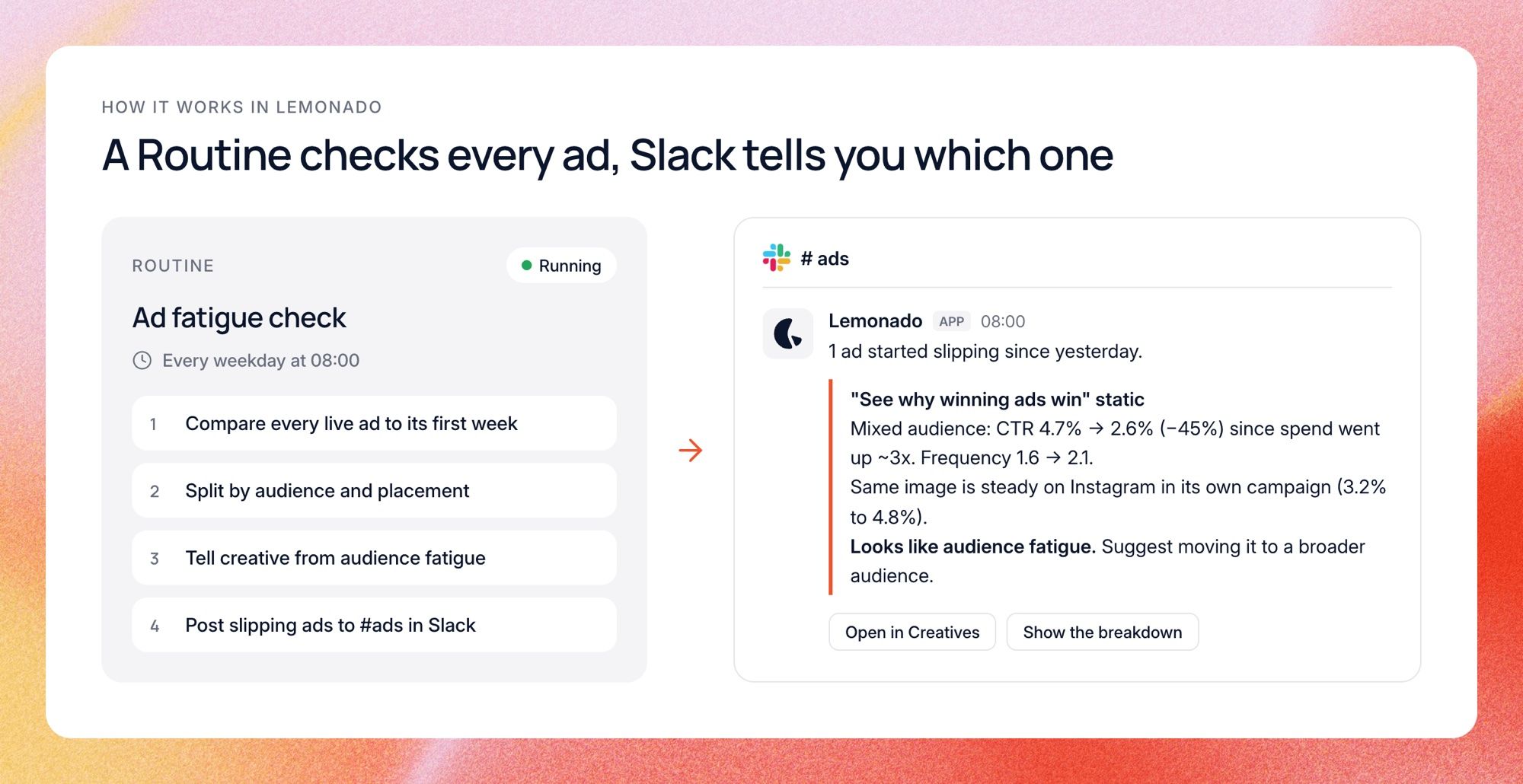
Setting it up takes one sentence. You tell Lemonado something like "Every weekday at 8, compare every live ad to its first week, split by audience and placement, and post anything slipping to #ads." It builds the Routine, and each message tells you which ad slipped, by how much, where, and whether it looks like creative or audience fatigue.
When you find a tired ad, ask what to make next. Lemonado remembers which hooks and formats worked for your account, and Creatives also shows what competitors are running. During the beta, marketing teams ran 12,000+ tasks and managed $40M in ad spend with Lemonado.
What it saves us
This is the Routine we run on our own account. Before it, someone spent about half an hour every morning pulling each live ad by placement and comparing it to its first week. Now the same check lands in Slack at 8:00 and takes about two minutes to read.
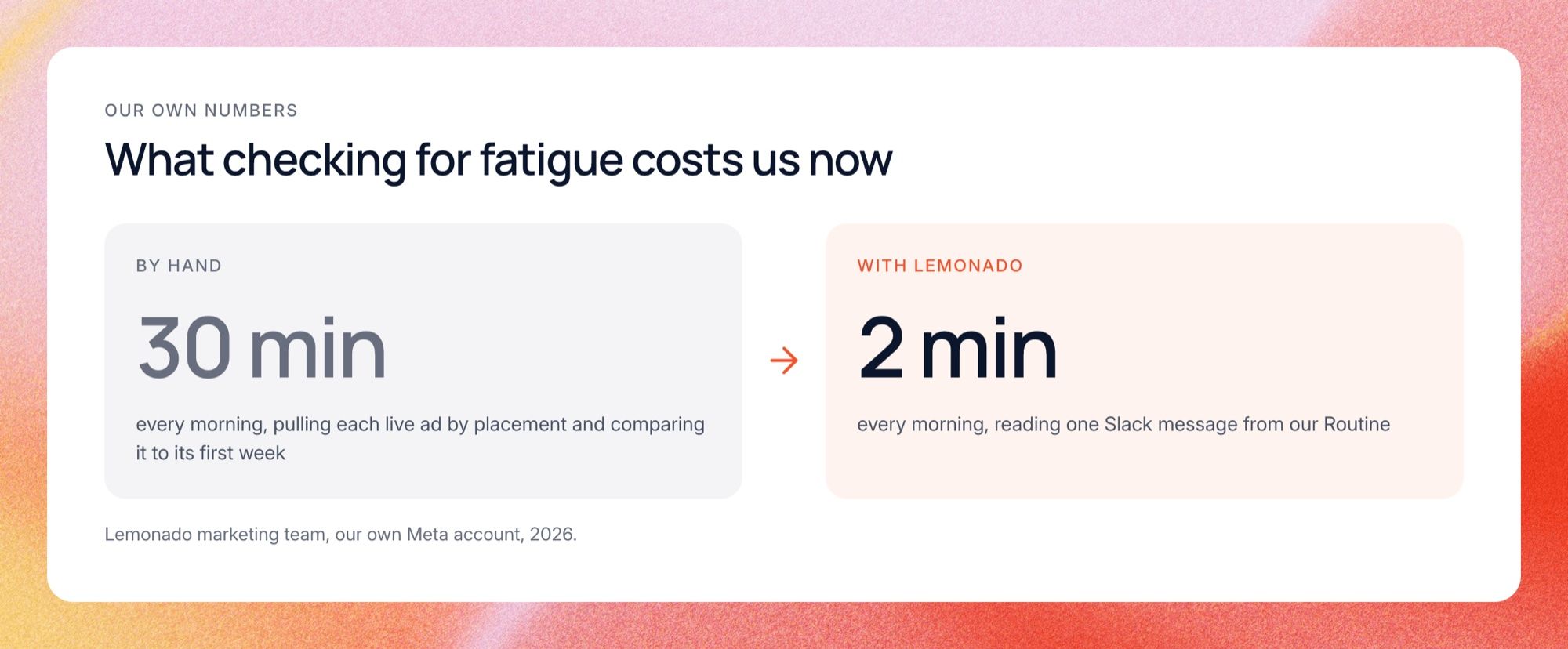
That is roughly two hours a week back, but the real gain is catching drops sooner. When the check was manual, it got skipped on busy days, and that is exactly when a winning ad quietly loses steam. Now we hear about it the morning it starts.
FAQs
These are the questions people ask most about ad fatigue. The short answer to most of them: watch each ad against its own history, and check placements before you blame the creative. The details depend on your audience size and budget.
How long does it take for an ad to fatigue?
It depends on audience size, budget and how distinctive the ad is. With a small audience and a big budget, an ad can wear out in a few days. With a broad audience, it can last months. On our own Meta account, new ads have usually started losing steam after about a week.
What frequency causes ad fatigue?
There is no single number. Many teams start watching closely once weekly frequency passes 2 to 3 for cold audiences. But frequency only matters if performance drops with it, so read it together with CTR and cost per result rather than on its own.
What is the difference between ad fatigue and creative fatigue?
They are mostly used as the same thing. Creative fatigue usually means one specific ad has worn out, while ad fatigue can also mean people are tired of your brand's ads in general. Meta's Ads Manager uses the term creative fatigue.
Does Meta tell you when an ad is fatigued?
Sometimes. Ads Manager can show a creative fatigue or creative limited status in the delivery column when an ad's cost per result is rising because it has been shown too often. It is a helpful flag, but it will not tell you about placement shifts or tracking problems.
Should I turn off a fatigued ad?
Not always right away. First confirm it is really fatigue, then lower its budget and move spend to a fresh version. Ads that wore out with one audience sometimes work again months later with a new hook.
Catch it before CPA moves
Ad fatigue is unavoidable. Finding out a week late is not. Check each ad against its own past, split by placement before you call it, and keep fresh ideas ready.
Try Lemonado free with $150 in credits and no card. Connect your ad accounts and see which of your ads are already slipping.