Step 1
Connect your tools, drop in your files
Pick from 3,000+ connectors, ad platforms to analytics, and add the briefs and brand files it should know.





Hand off reports, campaign checks, and analysis. Work with Lemonado in its AI workspace or directly from Slack.
Try for freeProduct demos lead on every paid channel right now, well ahead of lifestyle cuts. Your top three:
Product demo
Product close-up
Unboxing
The full ranking is in Creatives, with spend and fatigue per ad.
3 briefs posted for review
 #content
Describe a task, ask a question, or type / for skills...
Used by teams at












 Slack
Slack

 AI
AITag @Lemonado in Slack and hand the job over. Or access Lemonado in ChatGPT or Claude.
weekly-report
Maja8:02 AM
Pick a channel to see it work.
Step 1
Pick from 3,000+ connectors, ad platforms to analytics, and add the briefs and brand files it should know.
Step 2
Hand over a job in chat and put it on a schedule: a weekly report, a daily budget check, monitoring that never stops.
Step 3
It runs the job, shows every step, and delivers to Slack, email, or the workspace. You review and approve.
Weekly reporting, 90% faster
From hours to 10 minutes
What used to take me an hour or two, building reports and pulling together weekly insights, now takes around 10 minutes. Hours back in my week for strategy instead of data wrangling.
Read the story →
3 hours of digging saved
The CEO had no clue why they'd had a record-breaking month
I went into Lemonado, typed a prompt, and had his answer in 5 minutes. Facebook, Google, seasonality, year-over-year, a two-month forecast. Before Lemonado, that's three hours of digging.
Read the story →
Board to marketing, one source
The whole team uses Lemonado
Lemonado is wildly loved and adopted at Nofence. It powers our Claude, runs our reporting (no more Looker) and everyone from the board to marketing team rely on it.
Keeps tabs on budgets and results
Like having an extra colleague
As a performance marketing agency, we save time and raise the quality of our work by running it through Lemonado. It's almost like an extra colleague, keeping tabs on budgets and results.
Any job you hand over can become a routine: a report every Monday, a budget check every morning, monitoring that never stops.
Fatigue caught early, hook rates, video drop offs and competitor ads on shared boards.
Learn more →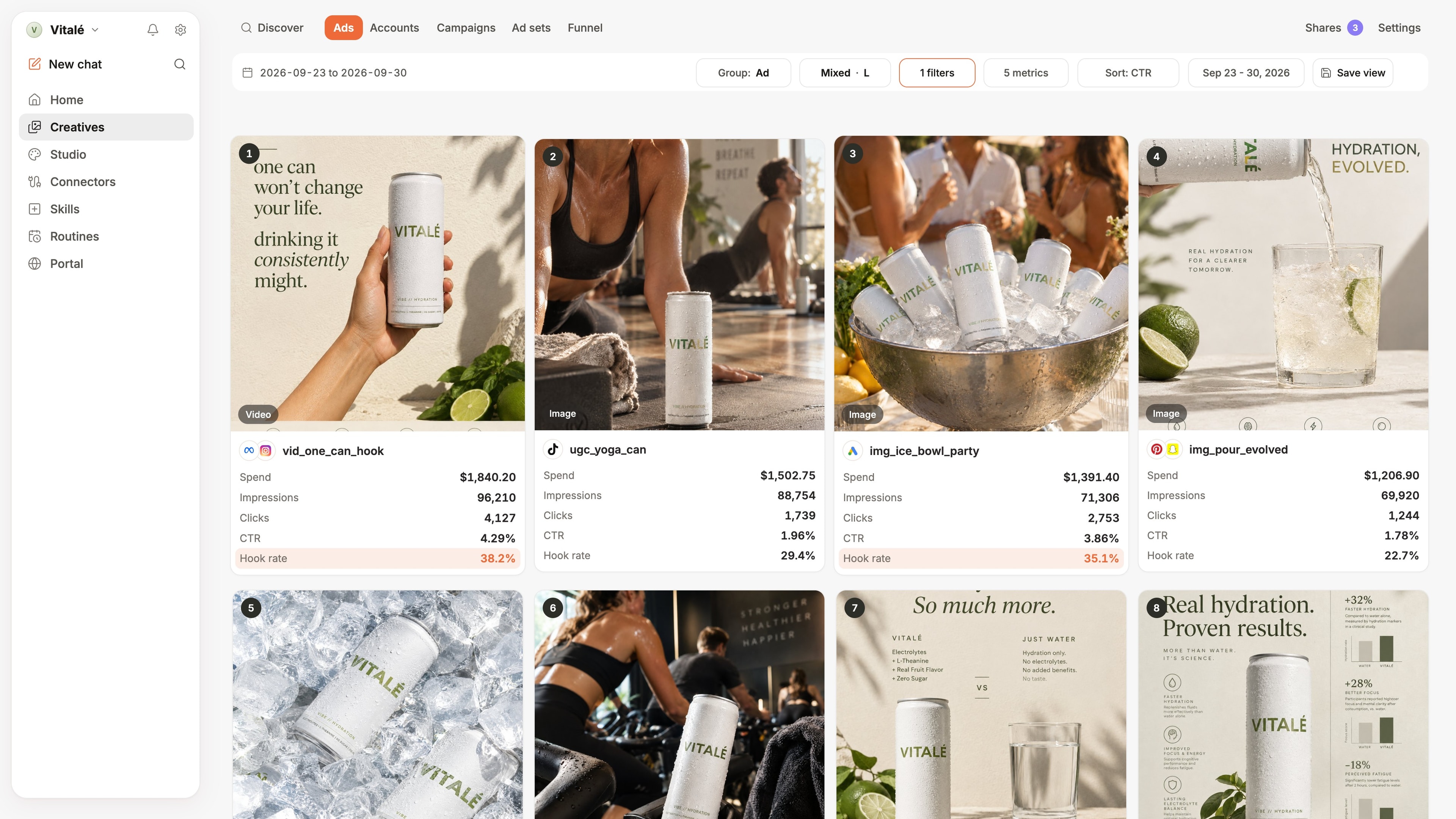
Reports, Dashboards and Decks. Brand and style it. Schedule it.
Learn more →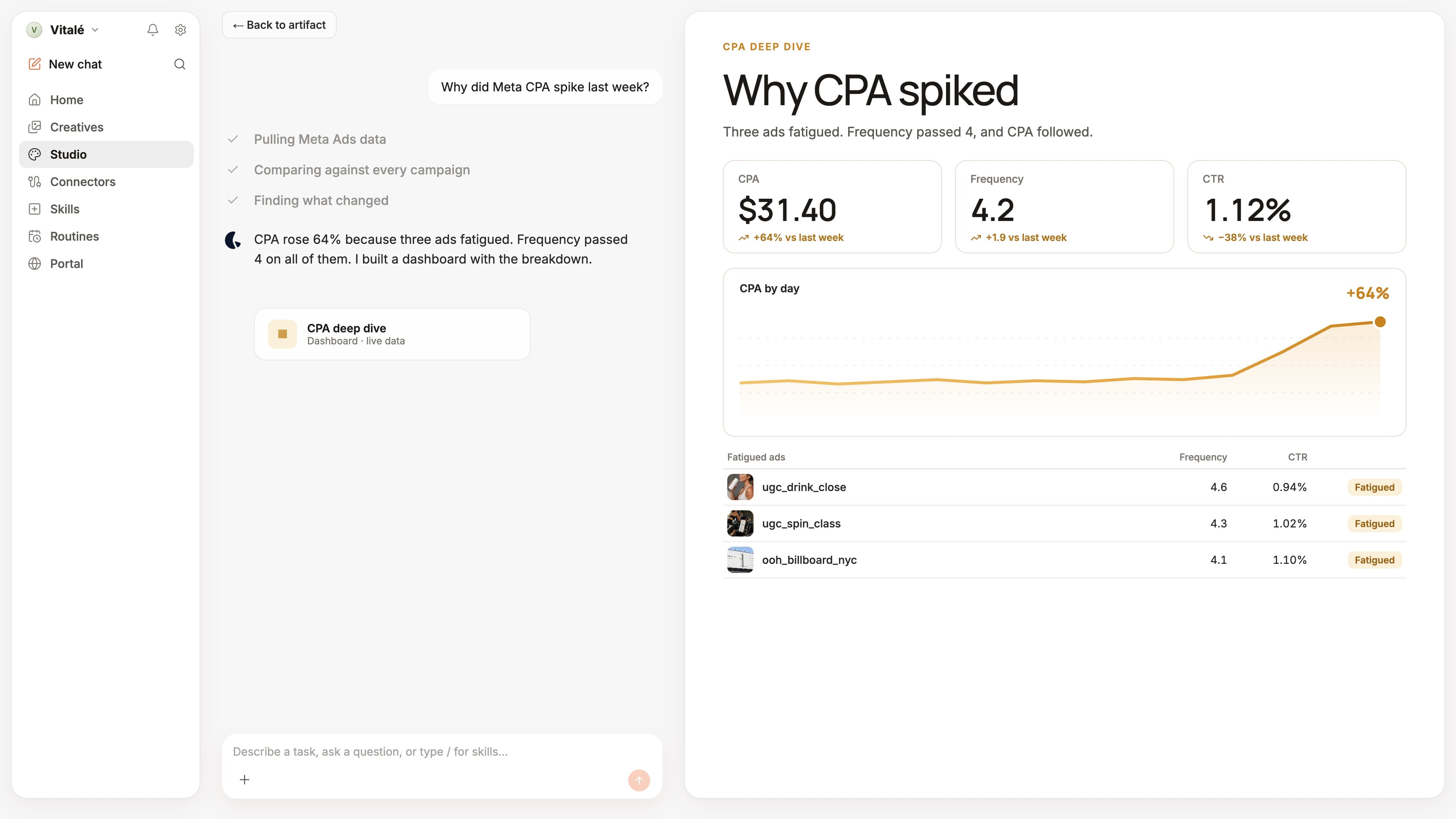
Reports built. Summaries posted. Budgets moved. You open the day to outcomes, not exports.
In Lemonado or in Slack, Outlook, Gmail, ChatGPT, Claude, Cursor or anywhere you work.
Definitions, client history, past analyses, what “good” means for you. Month six beats month one.
Light, dark, and custom color themes per workspace, so each brand or team is recognisable at a glance.
Dedicated workspace per client, reporting done, optimization daily. Agency-level tooling: templates, skills, a client portal, multi-MCP setup.
Lemonado for agenciesLemonado is your marketing team's AI co-worker. Like a hire, it connects to your entire stack and does the work end-to-end: pulling data, building reports, optimizing accounts. It executes, it doesn't just report, so your people spend their attention on decisions instead of busywork.
You work with it three ways: talk to it in Chat, work alongside it in the Studio and Ads workspaces, or hand work off to it with Tasks.
Yes. With Studio you build dashboards and reports by describing them, on live data, with no manual pipelines, no paid connector per source, and no drag-and-drop widget building. Studio refreshes in real time, not on a cron.
Then the same AI co-worker works on top of it: monitoring accounts, optimizing them, and delivering the reports on a schedule.
You can wire ChatGPT or Claude up to a few of your marketing tools today, and people do. The catch is what you get back. Each connector pulls raw data from one platform in isolation, with no shared definitions, no client context, and no governance. Ask a real question across Google Ads, Meta, LinkedIn, GA4 and revenue and you get a different answer every time, or no answer at all.
Lemonado is the layer underneath. We blend every platform into one governed, query-ready dataset, keep persistent context per client and brand, and expose it to ChatGPT, Claude, Cursor, or n8n through a single MCP. The AI tool you already use stays, but the answers are now grounded in your actual marketing data, and consistent across the whole team.
No. It does the manual work so your people spend their attention on judgment, strategy, taste, and clients. It is additive: it joins the team you already have, and gets better the more you work with it, because it keeps your team's shared context in one place.
Over 3,000. Native connectors cover the core marketing stack such as: Google Ads, Meta Ads, LinkedIn Ads, TikTok, Pinterest, Snapchat, YouTube, Google Analytics, Search Console, Google Sheets.
Beyond those, point Lemonado at any product with an API and it builds the connection itself, handling keys, auth, and setup. You can also upload CSVs straight into the same governed layer. See the full list on integrations.
Every question runs as a real SQL query against your live data, with full source attribution. You can see exactly which rows the answer came from, trace the logic, and verify the numbers. Answers are explainable, not speculative.
Yes, and that is the point: Lemonado executes rather than just reporting. It optimizes accounts and rebalances budgets through the connections you have granted, inside the workspace you granted them in. Every task and agent run is visible in the app, so you can see exactly what it did and when.
External AI tools connected over MCP (ChatGPT, Claude, Cursor, n8n) can never write to your accounts. Those connections are read-only by design.
Credits are used when the AI builds something new: answering a fresh question, generating an artifact, or creating a saved query. Simple actions use fewer credits, while deeper analysis uses more.
Saved queries keep data real time. Once a query is built, refreshing and viewing it does not burn credits again, so you pay to build, not to run. Smart caching reuses work where it can, so repeated asks cost fewer credits than starting from scratch.
Here are a few examples:
| User question | Work done | Credits |
|---|---|---|
| How much did we spend on Meta Ads for [Client Name] yesterday? | Retrieves a single client-specific spend data point from Meta Ads and returns the result. | 1 |
| Why are Google Ads conversions down for [Client Name] this week? | Pulls recent Google Ads data for the client, compares week-over-week performance, and highlights likely drivers of the decline. | 7 |
| Build a branded performance Studio for [Client Name] for Q2. | Collects data across connected client accounts, calculates KPIs, surfaces insights, and generates a structured, shareable Studio. | 30 |
Lemonado is built by a Swedish company, data is hosted in the EU, and GDPR-grade handling is the default rather than an add-on. Your data is never used to train AI models, ours or our providers'.
Every company or client lives in its own scoped workspace, and one workspace can never read another's data. Connector access is scoped and revocable at any time, and external AI connections over MCP are read-only. Enterprise adds SSO, row-level permissions, and white labeling.
For our DPA or a security questionnaire, email security@lemonado.io.
Two ways. Start free with the $150 in credits we front you, for up to 10 days, no card required. Or book a demo and we'll walk your stack with you.
Shoot us an email at hello@lemonado.io.
Try for freeConnect your stack. Hand off the busywork. See finished work land before the trial ends.