You know these problems
Every week is a data scavenger hunt
Reporting eats your best hours
Your AI tools don't know your clients
Everything your agency needs in one place
Lemonado learns while you work. Chat, reports, creatives, dashboards, and AI connectors for every client.


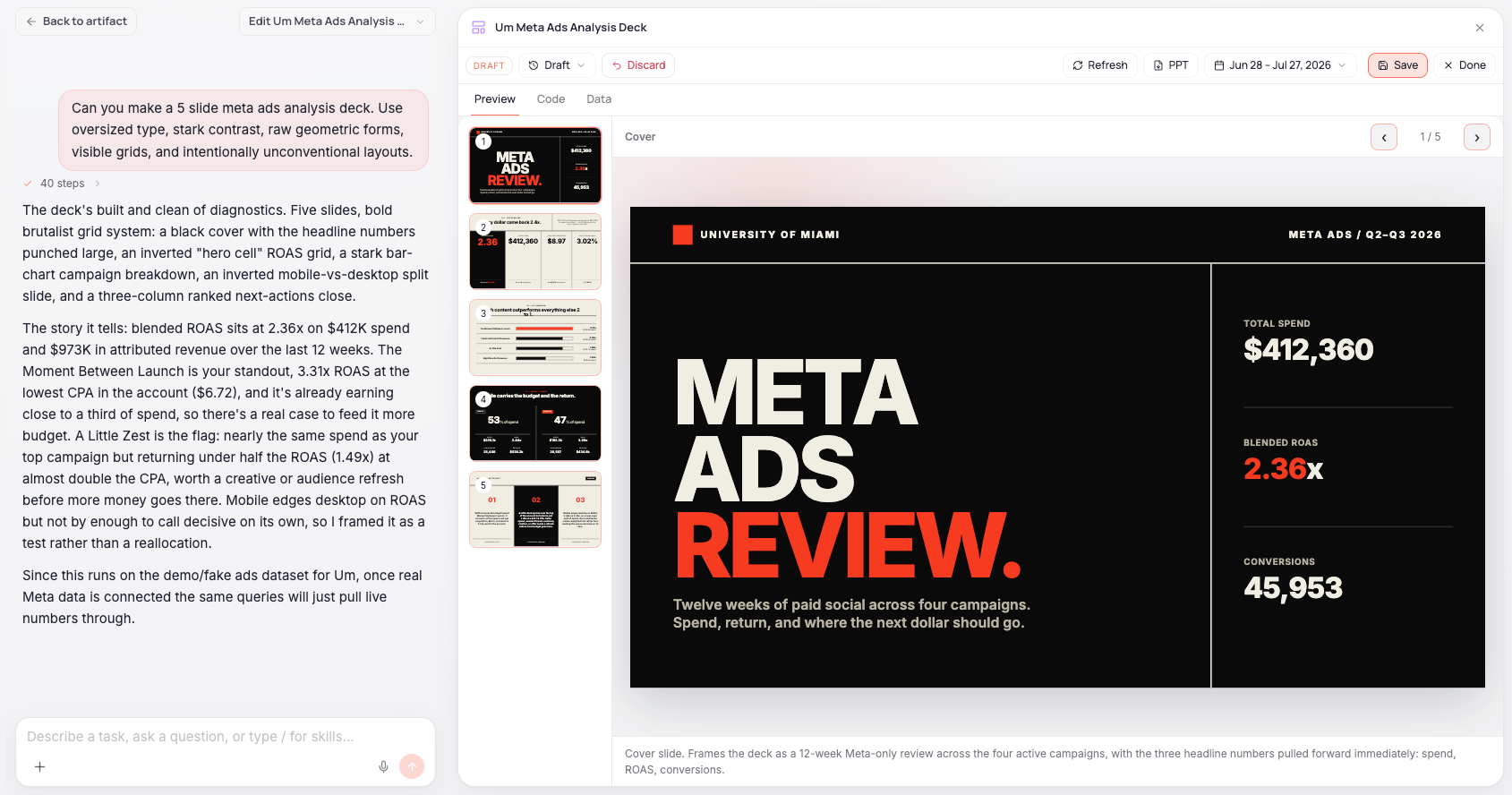
Studio
Any visual with real-time data, built for your clients. Interactive dashboards, multi-page apps, slide decks, reports. Embed them in your client portal or share a live link.
Collaborative Chat
Work alongside AI together with your team, your clients, and their data. Ask questions across all clients and platforms in natural language. Answered in seconds, grounded in live data.


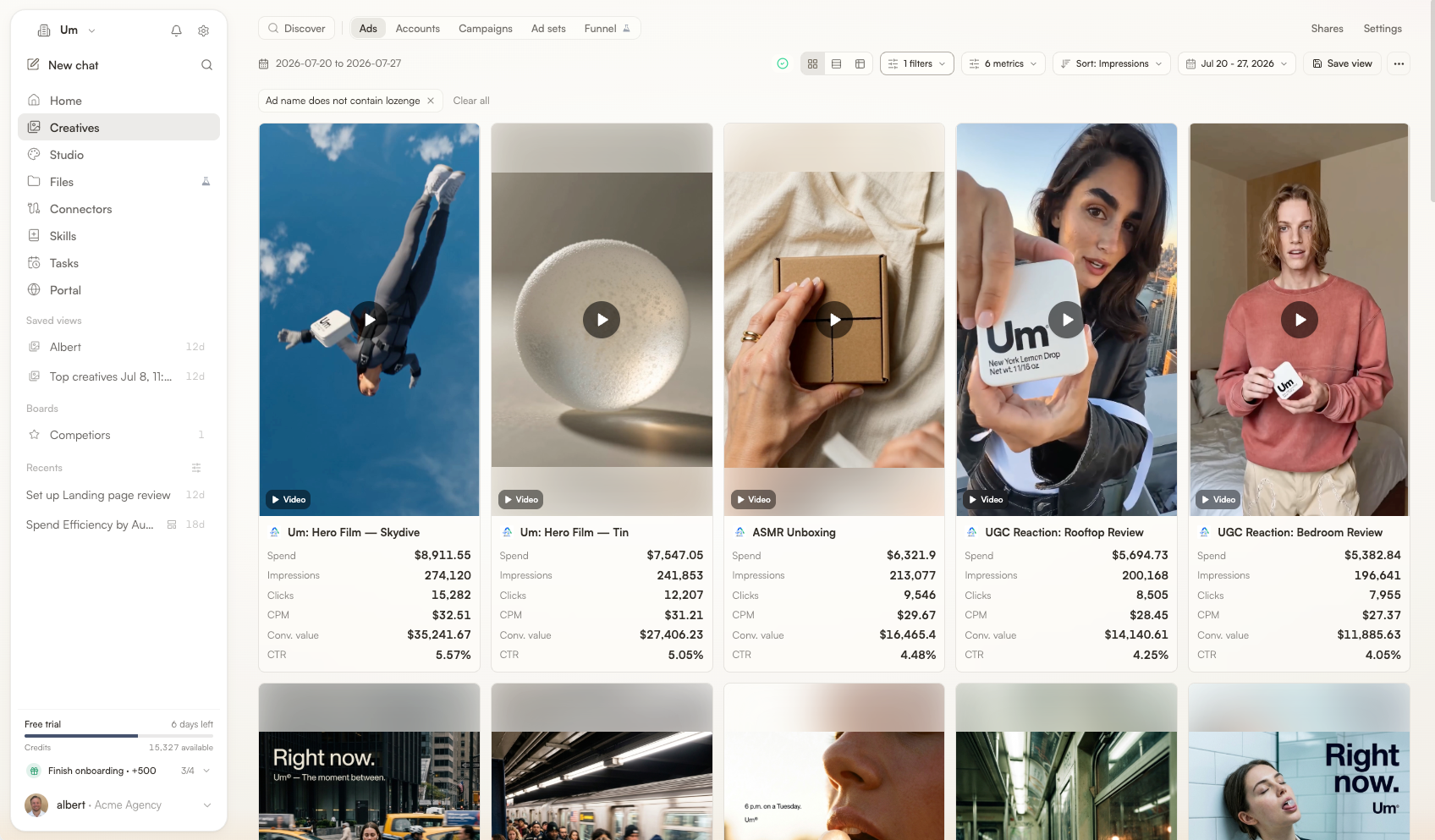
Creative analytics
Creative scoring, fatigue detection, spend breakdown across platforms. One view per client. Act before it's too late. No separate tool needed.
Automated reporting
AI-generated, branded, scheduled. Snapshot any client dashboard and ship it to Slack or email. Clients comment directly. Win new clients with better pitches.


Proactive agents
AI agents that monitor every client account, flag spend anomalies, and deliver morning summaries before you open your laptop.
Custom MCPs
Expose client data to ChatGPT, Claude, Gemini, or n8n. Scoped per client, read-only, governed.


Testimonials
One platform instead of a duct-taped stack
You're paying for one tool to pull data, another to report on it, a third to analyze creatives, and a fourth to visualize it. None of them talk to each other. None of them know your clients.
Today
With Lemonado
One subscription replaces 4-5 tools
~90% less time on reporting
AI generates the report. You review and refine.
Scale without scaling headcount
Persistent memory and automation mean onboarding a new client or brand doesn't require hiring.
One subscription replaces your tool stack
Data, reports, creatives, dashboards, and AI connectors in a single platform.
Your clients' data stays confidential
Built for agencies that handle sensitive performance data across multiple clients. Privacy, security, and governance are structural, not optional.
Client-scoped access
Data and outputs are isolated by workspace so only permitted users and agents can access them.
Controlled AI exposure
You choose which data each AI connector can access and can change or revoke access at any time.
Role-based access
Manage permissions by role and workspace to enforce clear data access boundaries across teams.
Frequently Asked Questions
What is Lemonado?
Lemonado is the AI-native data platform for marketing agencies and in-house teams. It connects every tool you use into one live data layer, then gives you Chat, Studio, agents, and MCP connectors on top, so your team and your AI tools can work from the same real-time context.
I already use ChatGPT or Claude. Why do I need Lemonado?
You can wire ChatGPT or Claude up to a few of your marketing tools today, and people do. The catch is what you get back. Each connector pulls raw data from one platform in isolation, with no shared definitions, no client context, and no governance. Ask a real question across Google Ads, Meta, LinkedIn, GA4 and revenue and you get a different answer every time — or no answer at all.
Lemonado is the layer underneath. We blend every platform into one governed, query-ready dataset, keep persistent context per client and brand, and expose it to ChatGPT, Claude, Cursor, or n8n through a single MCP. The AI tool you already use stays, but the answers are now grounded in your actual marketing data, scoped, read-only, and consistent across the whole team.
What tools does Lemonado integrate with?
Google Ads, Meta Ads, LinkedIn Ads, TikTok Ads, Pinterest Ads, Snapchat Ads, Google Analytics, Google Search Console, Google Sheets, Stripe, Snowflake, ClickHouse, and more. See the full list on integrations.
What data does Lemonado access?
Only what you explicitly connect. Every integration is read-only, governed via per-connector permissions, and never used to train AI. You can revoke access at any time.
How does Lemonado ensure AI answers are accurate and trustworthy?
Every question runs as a real SQL query against your live data, with full source attribution. You can see exactly which rows the answer came from, trace the logic, and verify the numbers. Answers are explainable, not speculative.
What are Lemonado’s core capabilities?
Lemonado gives marketing teams an AI-native way to work with their data in one connected platform.
Chat: Ask questions in plain language across every connected platform, with full client context and live data.
Studio: Build dashboards, reports, and multi-page docs from a prompt, branded and shareable.
Agents: Custom agents and alert monitors that run on schedule and deliver to Slack, email, or in-app.
Custom MCPs: Plug Lemonado into ChatGPT, Claude, Cursor, n8n, and more.
Slack: Bring Lemonado chat into any Slack channel, scoped to a single client or your whole company.
Insights, reports, and automations build on the same live data and persistent context. Nothing starts from scratch.
How can I start evaluating Lemonado?
You can evaluate Lemonado in two ways. Start a free 10-day trial for fast, self-guided exploration, or request a demo with our team. No credit card required.
Can Lemonado modify ad campaigns or budgets?
Lemonado’s data connectors are read-only. They do not use write endpoints and cannot create, edit, or pause campaigns, ads, budgets, or other data in your connected tools.
Is Lemonado GDPR compliant?
Yes. Lemonado is GDPR compliant. Data is hosted in the EU, every integration is read-only, and we sign DPAs with customers on request. Reach out to hello@lemonado.io for our DPA.
What can Lemonado agents do?
Lemonado has two types of agents you can spin up in two clicks:
Custom Agent: Run periodic analysis and produce structured reports. Examples: "Monitor weekly signups and churn," "Track revenue by plan tier every day," "Analyze support ticket volume."
Alert Monitor: Watch a metric and notify you when thresholds are breached.
Both can deliver to Slack, email, or in-app. The data, logic, and verification are already done. You just describe what you want.
What are client workspaces?
Each customer account or brand you manage gets its own workspace with connected data, custom context, and persistent memory. Lemonado learns each client's industry, ICP, KPIs, and history over time, so every answer is grounded in that client's full picture.
Why do agencies switch to Lemonado?
Real customer outcomes:
Stitch (NZ): Reporting cut from 1 to 2 hours per client to 10 minutes. 4 hours a day returned to strategy.
Collideascope (US): Ad hoc client analysis cut from 2 to 3 hours to 5 minutes.
Lemonado replaces the patchwork of reporting tools, dashboards, and data pipelines agencies usually stitch together, so client data, logic, and history stay connected.
Does Lemonado store my data?
Yes. Lemonado unifies your data in a private columnar OLAP database designed for high performance and reliability. It's read-only, never shared, never used to train AI, and you control what's synced and what the AI can access.
How do I get help if something goes wrong?
Email us at hello@lemonado.io.
What if the integration I need isn’t supported yet?
We're constantly adding new integrations. If the source you need isn't supported yet, reach out and we can prioritize it or discuss a custom integration. In the meantime, you can usually upload data via Google Sheets or CSV.
How often is my data updated?
Most ad platforms refresh in real time. Other sources refresh as frequently as their API allows. You can see the exact refresh cadence per source in the integration list.
How long does it take to set up an account?
Account setup takes about 2 minutes. Each integration takes around 30 seconds via OAuth. A typical agency is fully set up in under 30 minutes. You can always go deeper to customize context and workflows.
How can Lemonado help me analyze and optimize ad spend?
Once your ad accounts and analytics tools are synced, you can talk to your data directly. For example, you can ask:
• “Where am I overspending for low-quality leads?”
• “Which channel has the lowest CPL for MQLs?”
• “What’s my spend efficiency week-over-week?”
Lemonado’s unified data layer ensures every answer is accurate, connected, and up-to-date — no more manual exports or spreadsheets.
Can I use my marketing data inside ChatGPT or Claude without exposing sensitive credentials?
Yes. Lemonado acts as a secure middle layer. Your AI tool never touches your credentials or raw APIs, it only queries the governed dataset stored in or streamed to Lemonado. This means you can safely ask questions in ChatGPT or Claude about your live campaign data without giving those platforms direct access to your accounts.
Can Lemonado pull conversions or revenue from sources like HubSpot or GA4 to tie back to ad performance?
Absolutely. Lemonado can connect your ad spend data with downstream systems like GA4, HubSpot, or Stripe to reveal true revenue attribution. You can ask, “How much revenue did my LinkedIn campaign generate last quarter?” or “Which ad set drove the most SQLs?” and the AI will cross-reference all synced sources automatically.
Can Lemonado help me find wasted ad spend or underperforming campaigns?
Yes. Once your ad and analytics data are synced, Lemonado can surface underperforming segments across Google, Meta, and LinkedIn. You can ask questions like “Where am I overspending for low-quality leads?” or “Which campaigns have the lowest conversion rate?” and your AI will instantly analyze cross-platform data to show what’s driving results and what’s wasting budget.
Where is my data hosted?
Your data is hosted on Google Cloud in the EU. All connections are encrypted in transit and at rest.
Who can see my data inside my company or agency?
You control it. Each workspace has its own member list and permissions. You can scope access to specific clients, channels, or data sources, and remove anyone at any time. The AI only ever sees what the person asking the question is allowed to see.
Can I white-label reports for my clients?
Yes. Studio supports your logo, brand colors, and custom domains so reports look like they came from you, not from Lemonado.
Can my clients log in to view their own data?
Yes. You can give clients view-only access to their workspace and the Studios you publish for them. They see only their own data, never another client's. Great for replacing weekly decks with a live, always-on dashboard.
How is data isolated between clients?
Every client has its own workspace with its own connected data, members, and persistent memory. Queries, agents, and AI context are scoped to a single workspace. One client's data is never mixed with another's, and the AI cannot reach across workspaces.
What's the difference between a custom agent and an alert agent?
Custom agents run periodic analysis and produce a structured output. Examples: "Send me a Monday morning client digest," "Build a weekly performance Studio," "Track creative fatigue across all clients every day."
Alert agents watch a metric and only notify you when something breaks a threshold. Examples: "Tell me if any client's daily spend drops 30% below normal," "Ping me if CPA goes above $50 on any active campaign."
Use custom agents for proactive insight, alert agents for catching anomalies.
Where can I receive agent notifications?
Slack, email, or in-app. Each agent can route to whichever channel fits the audience: a client-facing Slack channel, the team's #performance channel, an exec's inbox, or all three at once.
Can I inspect what an agent actually did?
Yes. Every agent run keeps a full log: the prompt, the queries it ran, the data it pulled, and the output it delivered. You can open any past run, trace the logic, and verify the numbers. Agents are not a black box.
What can agents actually do?
Anything you can ask in chat, on a schedule. A few real examples:
Daily morning digest of how every client is performing
Weekly branded Studio delivered to each client's Slack channel
Alert if daily spend drops below 70% of expected on any active campaign
Flag creative fatigue when a top ad's CTR falls two weeks in a row
Pixel and conversion tracking health check across every client account
If you can describe it, you can build it. No code, no workflow tools.
Can clients or external collaborators join a chat?
Yes. You can invite a client (or any external collaborator) into a specific workspace with view-only or contributor access. They see only that workspace's data, can ask their own questions, and never touch other clients.
How do I migrate from Looker Studio, Supermetrics, or Funnel.io?
Most teams run Lemonado in parallel for a couple of weeks, rebuild the dashboards they actually use (much faster than the original since you describe them in chat), then turn the old tools off. We'll help you do it. Send your existing dashboards or report templates to hello@lemonado.io and we'll match them in Lemonado for you.
What's the difference between Lemonado and Supermetrics or Funnel.io?
Supermetrics and Funnel are data pipes. They move marketing data into Looker Studio, Sheets, or a warehouse, and stop there. You still need someone to build dashboards, write reports, and hunt down anomalies.
Lemonado is the full layer above the pipe. The data is connected, blended, and queryable in real time. On top, you get chat, branded reports, automated agents, and MCP connectors to ChatGPT or Claude. The pipe and the work happen in one place.
Who uses Lemonado?
Marketing agencies and in-house marketing teams. From small agencies managing 10-20 clients to in-house teams running cross-platform spend in the millions. See the case studies for what real customers are doing with it.
Still have a questions?
Shoot us an email at hello@lemonado.io.
Stop fighting with data. Start feeding your AI.
Connect your data to AI and free your team from reporting and busywork.