Claude Skills for Paid Media with Lemonado MCP
Claude Skills are powerful — but they're only as good as the data behind them. This guide walks you through connecting Lemonado MCP to Claude so every Skill runs on live campaign data, not whatever you last exported.


What are Claude Skills?
A skill is a set of instructions, packaged as a simple folder, that teaches Claude how to handle specific tasks or workflows.
A skill folder contains:
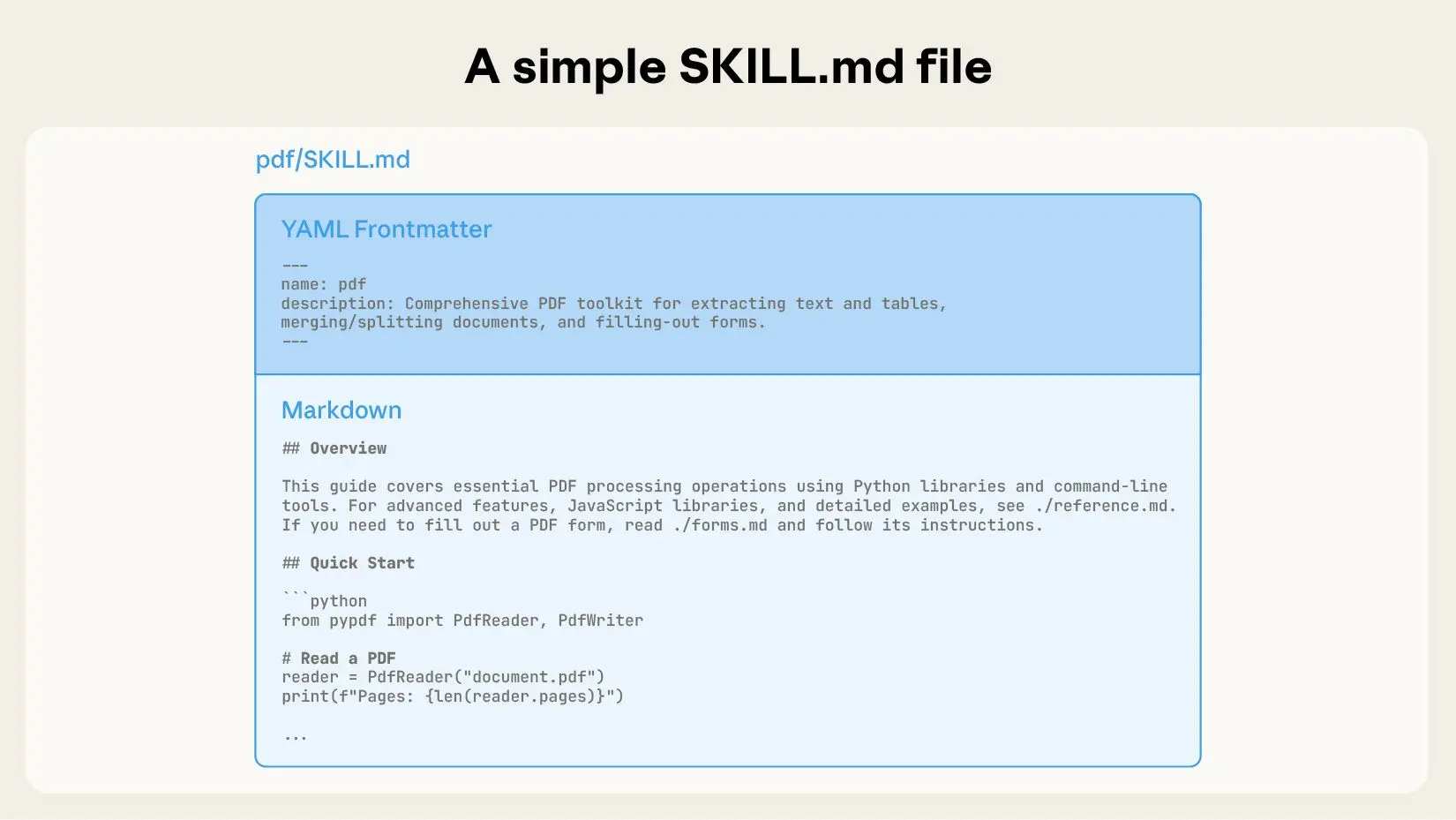
SKILL.md (required): Instructions in Markdown with YAML frontmatter
scripts/ (optional): Executable code (Python, Bash, etc.)
references/ (optional): Documentation loaded as needed
assets/ (optional): Templates or files used in output
Skills use a three-level system:
First level (YAML frontmatter): Always loaded. Tells Claude when to use the skill.
Second level (SKILL.md body): Loaded when Claude thinks the skill is relevant. Contains full instructions.
Third level (Linked files): Additional files Claude can navigate and load as needed.
This keeps token usage low while giving Claude deep, specialized knowledge exactly when it needs it.

What is Lemonado and where does it fit?
Lemonado is an AI-native data platform for marketers. It unifies your ad platforms, analytics tools, and business data into a single queryable layer so AI agents can answer questions, automate workflows, and monitor performance on your behalf.
Lemonado connects to Claude via MCP (Model Context Protocol), the same open standard that Skills are built on.
The kitchen analogy from Anthropic says it well:
MCP provides the professional kitchen: access to tools, ingredients, and equipment
Skills provide the recipes: step-by-step instructions on how to create something valuable
Lemonado is the kitchen, Skills are the recipes. Together they give Claude everything it needs to analyze, report on, and surface insights from your ad accounts.
Here's our full guide on how to connect your Lemonado workspace to Claude.
MCP without Skills vs. MCP with Skills
Without Skills | With Skills | |
|---|---|---|
Data access | Live data via Lemonado MCP ✅ | Live data via Lemonado MCP ✅ |
Workflow | You explain the task every time | Claude knows the workflow automatically |
Consistency | Varies by how you prompt | Same output, every time |
Starting point | Blank chat | Skill activates when relevant |
Best for | Ad hoc questions and exploration | Repeatable workflows: reports, audits, reviews |
Who this guide is for:
Performance marketers already using Claude who want to stop pasting CSVs
Paid media managers running the same reports and audits every week
Agency operators managing multiple clients who need consistent, scalable workflows
What you'll need:
A Lemonado account with at least one data source connected. Sign up here for free
A paid Claude subscription (Skills require Claude Pro or Team)
Three use cases to start with
Use this framework to identify where Skills will save you the most time.
Ask yourself:
What do I explain to Claude over and over?
What reports do I rebuild manually every week?
What analysis do I run across every client account?
Those are your Skill candidates. Here are three to start with:
Use Case 1: Weekly Performance Report
Every week, the same task. Pull the numbers, calculate the deltas, write the summary, send it to the client. A Skill automates the workflow. Lemonado provides the live data it runs on. The result is a client-ready report that generates itself.
Trigger: "Run the weekly report for [client]" or "generate this week's performance summary"
Steps:
Query the last 7 days of campaign data from Lemonado for the specified client
Calculate core metrics: spend, ROAS, CPA, CTR, and conversions vs. the prior 7 days
Flag any campaign where performance moved more than 15% in either direction
Structure output as a client-ready summary: headline metrics, notable changes, and one recommended action per flagged campaign
Result: A formatted performance summary pulled from live data, ready to send without editing.
Key techniques:
Dynamic date ranges so the Skill never uses hardcoded periods
Client scoping via Lemonado so the query only pulls the right account
Threshold-based flagging to surface what matters without noise
Output templated to match your reporting format
Use Case 2: Account Audit
Account audits are high-value and time-consuming. They require pulling data across campaigns, normalizing it against benchmarks, and forming a clear point of view on what to fix first. This Skill runs that process end to end, coordinating multiple Lemonado queries in sequence before producing a prioritized output.
Trigger: "Audit [client]'s account" or "what needs attention this week" or "where are we losing money"
Steps:
Pull campaign and ad set data across all active spend from Lemonado
Score each campaign against configurable benchmarks: ROAS floor, CPA ceiling, CTR threshold, impression share minimum
Rank campaigns from worst to best performing against those benchmarks
For the bottom three, surface the specific metric that's failing and why it matters
Recommend a next action for each: pause, restructure, adjust bid strategy, or test new creative
Result: A prioritized audit with clear reasoning and recommended actions, grounded in live account data.
Key techniques:
Multi-step MCP queries coordinated in sequence (campaigns, then ad sets, then creatives)
Benchmark thresholds embedded in the Skill so you don't re-explain them every time
Reasoning tied to specific metrics, not generic observations
Configurable per client based on their goals and KPIs stored in Lemonado
Use Case 3: Creative Fatigue Review
Creative fatigue is one of the most common and most missed performance drains in paid media. CTR drops gradually, CPC creeps up, and by the time you notice, you've wasted two weeks of budget. This Skill monitors trend data across your active creatives and flags what needs to be replaced before it becomes a problem.
Trigger: "Check creative performance" or "what ads are burning out" or "which creatives should I refresh"
Steps:
Pull CTR and CPC data by creative for the last 14 days from Lemonado, segmented by ad set
Calculate week-over-week trend for each creative: CTR delta and CPC delta
Flag creatives where CTR has dropped more than 10% or CPC has risen more than 15% week-over-week
Identify the specific ad sets where fatigue is most concentrated
Cross-reference against top performers in the same campaign to surface what's working as a reference point for replacement
Result: A creative fatigue report that tells you exactly what to kill, where to focus new production, and what benchmarks to beat.
Key techniques:
Trend analysis over rolling windows rather than single-period snapshots
Ad set level segmentation so fatigue is caught before it drags campaign-level numbers
Cross-referencing winners and losers in the same query for immediate creative direction
Embeds paid media best practices around frequency thresholds and fatigue signals
Three community Skills to try now
These are built by Corey Haines and available as copy-paste markdown files. Each one becomes significantly more powerful when Lemonado MCP is connected. Instead of working from pasted data, Claude queries your live accounts for you.
paid-ads → View on GitHub 🔗
Covers campaign structure, optimization logic, and performance analysis for Google and Meta. With Lemonado connected, every recommendation is backed by live spend, ROAS, CPA, and impression share.
Install:
analytics-tracking → View on GitHub 🔗
Covers measurement, attribution, and conversion analysis. With Lemonado's Google Analytics integration connected alongside your ad platforms, this skill can answer the question most marketers can't easily answer: did the campaign drive conversions, or just clicks?
Install:
ad-creative → View on GitHub 🔗
Generates and iterates ad headlines, descriptions, and primary text. With Lemonado data behind it, Claude can see actual CTR and CPC performance per creative before writing the next iteration. It's not generating blindly — it's optimizing against what's actually working.
Install:
Build your own Lemonado-native Skill
Most community skills are general-purpose. A Lemonado-native Skill is scoped to your clients, your metrics, and your reporting structure.
Good starting points:
A Budget Pacing Skill that checks mid-month spend across all active campaigns and flags clients projected to over or underspend
A Brand vs. Non-Brand Skill that pulls search term data and splits performance automatically, no pivot tables required
A Client Report Skill scoped to a specific account's goals, KPIs, and reporting tone
To build one, follow Anthropic's skill structure: create a folder, add a SKILL.md file with YAML frontmatter, and write your workflow as clear, step-by-step instructions. Reference your Lemonado MCP connection as the data tool.
Full build guide from Anthropic: resources.anthropic.com
Pre-launch checklist
Before your Skill is ready to use:
Setup
◽ Lemonado MCP connected and confirmed in Claude settings
◽ At least one data source active (Meta Ads, Google Ads, or Google Analytics)
◽ Paid Claude subscription active
If installing community skills
◽ Skill installed via npx add-skill or manual copy
◽ Tested with an obvious trigger phrase ("run a performance audit")
◽ Confirmed Claude queries Lemonado data, not asking you to paste anything
If building your own
◽ SKILL.md file exists with YAML frontmatter
◽ Trigger description covers WHAT and WHEN
◽ Steps are clear and reference Lemonado MCP as the data source
◽ Tested with real client data
◽ Error handling included (what if a data source returns nothing?)
Not ready to build? Start simpler.
If this feels like too much setup, you have two options.
Just want to ask questions first? Connect Lemonado MCP to Claude and ask: "How did my Meta campaigns perform last week?" No Skills required. The MCP connection alone gets you most of the way there.
Rather skip the setup entirely? Lemonado's built-in agent works out-of-the-box — no Skills to install, no MCP to configure, no Claude subscription required. You get:
Live connectors for Meta Ads, Google Ads, LinkedIn Ads, Google Analytics, and more
An AI agent that answers questions, builds reports, and audits accounts
Scheduled reports delivered automatically: daily, weekly, or monthly
Client-scoped dashboards so every client only sees their own data
Multi-client management from a single workspace
We offer a 10-day free trial — signup here to get started.
Share this post
More tutorials

Stop fighting with data. Start feeding your AI.
Connect your data to AI and free your team from reporting and busywork.